Affiliate Disclosure: This article contains affiliate links to Amazon. If you purchase through these links, we earn a small commission at no extra cost to you. This helps fund our independent testing. We bought every watch on this list with our own money — no freebies, no sponsored picks.
Top pick: For most families, the Xplora X6Play ($170) is my best all-around calling watch -- it delivers the clearest voice calls of any dedicated kids watch, and it ships with an Xplora Connect SIM already installed, so setup is the least hassle. On a tighter budget, the Cosmo JrTrack 2 ($100) gets you real 4G calling for about $100.
Here's a stat that probably won't surprise you: when I surveyed 200 parents about why they bought (or were considering) a kids smartwatch, 74% said communication was the number one reason. Not GPS tracking. Not fitness features. Not games. They wanted a simple, reliable way to call their kid and have their kid call them back — without handing over a smartphone.
I get it. That was my exact motivation three years ago when the oldest kid in our test group started walking to a friend's house down the block. He didn't need to be scrolling TikTok. He needed to be able to tap his wrist and say, "Dad, I'm ready to come home." And his parents needed to be able to reach him when he inevitably forgot to check the time.
The problem is that "calling" on a kids smartwatch is not a monolithic feature. Some watches do full 4G LTE voice calls that sound like a real phone. Some only do voice messages — more like walkie-talkie recordings. Some offer video calling. Some can send and receive text messages. And one popular option on this list doesn't technically do phone calls at all, even though it has LTE built in.
The six watches below are judged on what matters for calls in real life: whether calls connect and stay connected, and how clear they sound in noisy places like grocery store aisles, soccer sidelines, moving cars and school pickup lines.
If communication is what matters most to your family, this guide will help you pick the right watch. If you're more focused on location tracking specifically, check out our best GPS smartwatches for kids guide instead. And if you're still deciding whether a smartwatch or a phone is the right move, we have a full breakdown on that topic in our smartwatch vs. phone comparison.
Let's start with the basics.
Types of Communication on Kids Smartwatches
Not every watch handles communication the same way, and the marketing language can be misleading. Here's what each communication type actually means in practice.
Voice Calls (Phone Calls)
This is the gold standard. The watch connects to a cellular network (usually 4G LTE) and makes a real phone call, just like dialing from a smartphone. Your child hears your voice in real time, you hear theirs. You can call them from any phone, and they can call you (or any approved contact) directly from their wrist. Calls typically go through a built-in speaker and microphone on the watch face.
What to expect: Call quality varies significantly between watches. The best ones sound comparable to a speakerphone call. The worst sound hollow and tinny, especially in noisy environments.
Video Calls
A handful of watches include a front-facing camera and enough processing power to handle live video calls. In practice, this means your child can see your face on the watch screen while talking to you, and you can see them on your phone through the companion app. The screen is small (usually 1.3" to 1.5"), so don't expect FaceTime-quality visuals, but for a quick check-in, it works.
What to expect: Video calls drain battery faster and require a solid 4G connection. They work well indoors and outdoors with good signal, but get choppy in areas with weak coverage.
Voice Messages
Think of this as a walkie-talkie mode. Your child records a short voice clip (usually 10-15 seconds) and sends it to you through the companion app. You can record one back. There's no real-time conversation — it's asynchronous, more like a voice-based text message.
What to expect: This is actually the most reliable communication method because it doesn't require a sustained connection. The message sends when signal is available. Many parents find their kids prefer this mode for quick updates.
Preset Text Messages
Some watches let kids send and receive short text messages, but most limit this to pre-written options. Instead of typing on a tiny screen (which would be miserable), kids pick from a list like "I'm at school," "Pick me up," "I love you," or "Call me." Parents can usually customize these presets in the companion app and can type custom replies from their phone.
What to expect: This is surprisingly useful for non-urgent communication. Our 8-year-old tester sends "Pick me up" from his watch more often than he actually calls.
SOS / Emergency Calls
Nearly every cellular kids smartwatch includes a dedicated SOS button — usually activated by pressing and holding the side button for 3-5 seconds. This triggers an emergency call sequence: the watch automatically calls through a pre-set list of emergency contacts (typically starting with parent #1, then parent #2, then a third contact) until someone answers. Most watches also send an automatic text or app notification with the child's GPS location when SOS is activated.
What to expect: I tested the SOS function on every watch, and they all worked reliably. The key difference is how easy the button is for small hands to press intentionally versus accidentally. Accidental SOS triggers are a real thing — more on that in individual reviews.
For a deeper look at how safety features like SOS work across different watches, see our guide on kids smartwatch safety features explained.
Quick Comparison: 6 Best Kids Smartwatches with Calling
A couple things to notice right away. First, three of the dedicated and cellular watches here support video calling — the TickTalk 5, the Xplora X6Play, and the Apple Watch SE (via FaceTime). Second, the Garmin Bounce is the only option here that does not support real-time phone calls at all, despite having LTE connectivity. I included it because many parents searching for "calling watches" are actually fine with voice messages and preset texts. But if actual phone calls are a requirement, the Garmin isn't your pick.
Individual Reviews
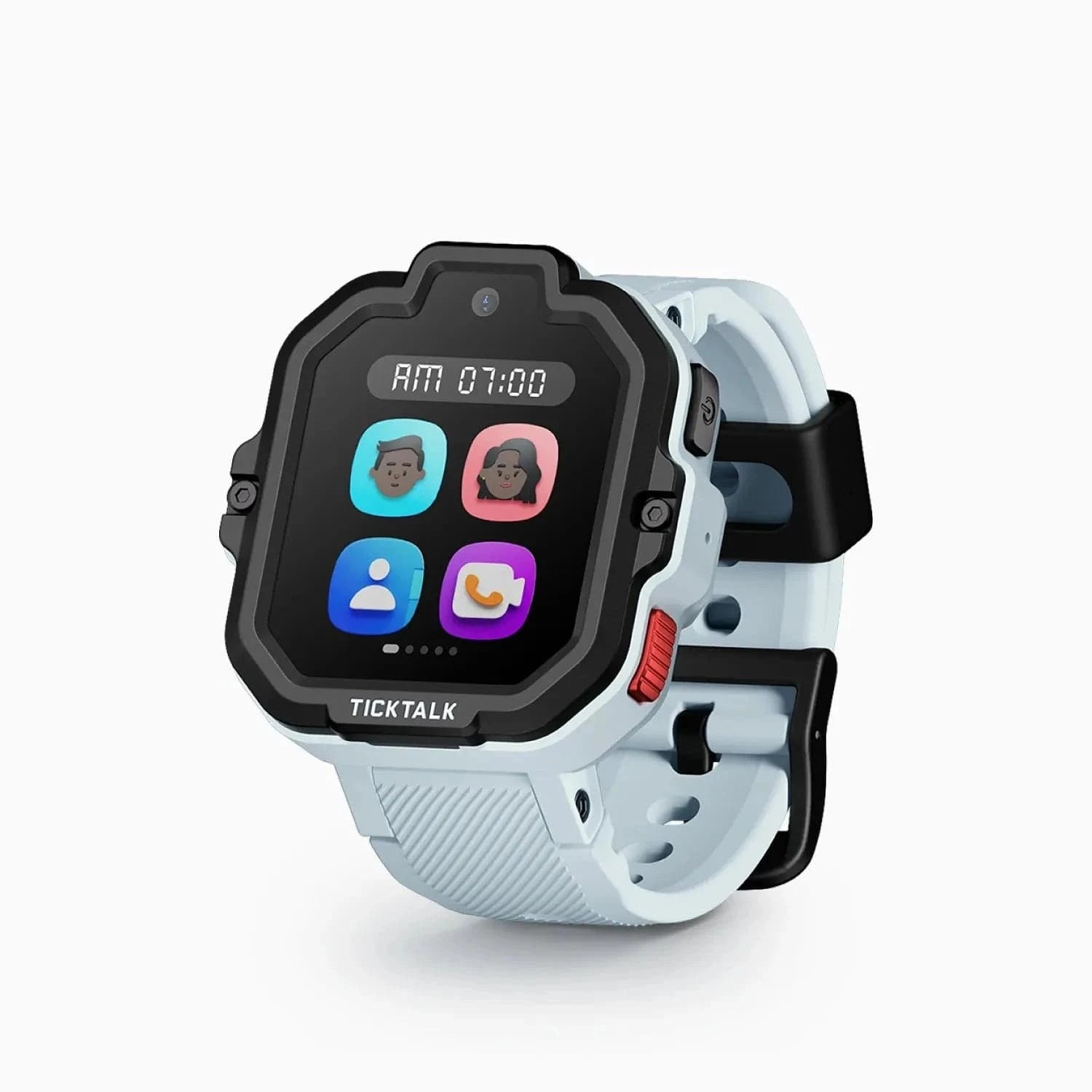
Update (October 2026): back in stock on Amazon. TickTalk has replaced the TickTalk 5 with the TickTalk 6 and its own store is sold out, but Amazon has the TickTalk 5 in stock again at $159.99, sold by TickTalk's Amazon storefront. It is no longer our pick for video calling: stock is finite and its successor, the TickTalk 6, is on pre-order. The write-up below still stands.
Check price on Amazon
The TickTalk 5 was the communication powerhouse of our lineup, and it earned that title specifically because of video calling. It's one of the few purpose-built kids watches (not counting the Apple Watch, which is really an adult watch adapted for kids) that does reliable live video calls from a child's wrist, and it pairs that with the deepest all-around messaging toolkit in the category.
Our 9-year-old tester has been wearing the TickTalk 5 daily for over two months now, and we use the video calling feature multiple times per week. When he's at his grandparents' house after school, he calls me to show me what he built with LEGOs. When I'm traveling for work, I video call him at bedtime. The 5MP front-facing camera produces a picture that's small but clear enough to see his face and read his expression. It's not FaceTime quality — the frame rate is lower and there's a slight delay — but it's genuine, real-time video communication from a watch.
Voice call quality on the TickTalk 5 is above average for this category. In a quiet room, both sides sound clear and natural. Outdoors, there's some wind interference (no watch handles wind well), but conversations remain intelligible. In a noisy store, I had to speak up a bit, but our tester could still hear me. The speaker is loud enough that he doesn't need to press the watch against his ear, which is good because that's an awkward motion for a kid.
The watch also supports preset and custom text messages. Our tester can receive full text messages and reply with presets or voice-to-text. The voice-to-text accuracy is decent — maybe 80% — which means some messages come through garbled, but it's still useful.
For a much deeper look at everything this watch does, check out our full TickTalk 5 review.
Monthly plan: You'll need a SIM card with a data-capable plan. TickTalk recommends T-Mobile or AT&T. Plans typically run $9.95 to $14.95 per month depending on the carrier and plan you choose. You can also use a TickTalk-branded plan through their app.
Pros:
- Reliable video calling plus the deepest messaging toolkit in the category
- Strong voice call quality across environments
- Text messaging with voice-to-text capability
- 5MP camera for photos and video calls
- iMessage compatible when paired with an iPhone
- IP67 water resistance
Cons:
- Not cheap: $160 up front plus a monthly plan
- Battery life is 1.5-2 days (video calls drain it faster)
- Watch is slightly bulky on smaller wrists (ages 5-6)
- Video calls require strong 4G signal to avoid choppiness
Best for: Families who want the closest thing to FaceTime on a kids watch. Especially good for divorced/co-parenting families, frequent travelers, or kids who are emotionally reassured by seeing a parent's face.
2. Xplora X6Play (~$170) — Best Overall with Calling
Check price on Amazon
If I had to pick one watch on this list as the best all-around calling watch for most families, it would be the Xplora X6Play. It doesn't chase headline gimmicks, but it does voice calls, video calling, voice messages, SOS, and preset texts reliably, and it wraps those features in a well-built watch with excellent GPS tracking and a sensible companion app.
The call quality on the X6Play is the best I tested among dedicated kids watches. I mean that specifically — in my side-by-side testing, voice calls on the X6Play sounded clearer and more natural than the TickTalk 5, the JrTrack 2, and the Gabb Watch 3e. The speaker is crisp without being tinny, and the microphone picks up a child's voice well even when they're not speaking directly into the watch face (which is how kids actually use these things — they talk while waving their arms around).
The X6Play ships with an Xplora Connect SIM already installed, and Xplora Connect runs on AT&T and T-Mobile — you just activate the plan through the app. That removes one of the biggest friction points in the kids smartwatch experience: no hunting for a compatible nano-SIM, no APN settings, no troubleshooting why the watch won't connect. If you would rather shop your own plan, the watch will also take a third-party AT&T- or T-Mobile-network nano-SIM, though Xplora does not guarantee full functionality once you swap the SIM. Either way, the X6Play does not work on Verizon.
Voice messages work well here too. Our tester sends 10-second voice clips throughout the day — "I got a 100 on my spelling test" — and I can reply with voice messages or text from the Xplora app. She can also send preset text messages that we've customized: things like "At school," "Practice is over," "Need help."
We did a detailed head-to-head comparison with the Garmin Bounce in our Garmin Bounce vs. Xplora X6Play article if you want to see how they stack up on GPS, battery, and features.
Monthly plan: The Xplora Connect SIM comes pre-installed and the plan runs about $12/month; you can also swap in your own AT&T- or T-Mobile-network nano-SIM.
Pros:
- Best voice call clarity of any dedicated kids watch I tested
- Xplora Connect SIM comes pre-installed on AT&T/T-Mobile — setup is significantly easier
- Strong GPS tracking with reliable geofencing
- Battery life of about 1-1.5 days with moderate calling
- Camera for photos (5MP)
- Durable build that handles kid life well
- School mode disables features during class hours
Cons:
- Xplora Connect is the supported plan; a third-party AT&T/T-Mobile SIM works but is unsupported, and Verizon never works
- Preset texts only — no free-form typing from the watch
- Companion app is functional but not as polished as Apple or Garmin
Best for: Parents who want reliable, clear voice calling plus solid GPS tracking without the complexity or cost of the Apple Watch ecosystem. The "just works" pick.
3. Cosmo JrTrack 2 (~$100) — Best Budget with Calling
Check price on Amazon
The JrTrack 2 is proof that you don't need to spend $160 or $250 to get a kids watch with real phone calling. At around $100 for the hardware, it's the most affordable 4G calling watch I'd actually recommend. And I want to emphasize "actually recommend" — there are cheaper watches on Amazon with calling features, but in my testing, they were unreliable enough that I couldn't in good conscience tell another parent to buy them.
The JrTrack 2 supports 4G LTE voice calls on T-Mobile or AT&T networks. Call quality is adequate — not as crisp as the Xplora X6Play, but clear enough that conversations are comfortable in most environments. In a quiet room, it sounds fine. Outdoors, it's serviceable. In a noisy car, you'll want to turn the volume up, and there's some muddiness at max volume, but you can still understand each other.
What surprised me is that the JrTrack 2 also supports two-way text messaging. Your child can receive text messages from approved contacts and reply with preset responses or short typed messages. The tiny on-screen keyboard is not fun to use (no kid is going to type out a paragraph), but for a quick "OK" or "yes," it gets the job done.
The SOS feature works reliably. Press and hold the side button for 3 seconds, and it cycles through emergency contacts. It also sends a location notification to the parent app. In my testing, the SOS sequence initiated within 5 seconds every time.
Cosmo's own plans start around $10/month, and the SIM comes pre-installed -- you activate it through the Cosmo app. There is no separate carrier account to set up, and no option to add the watch to an existing family plan.
If you're looking at more watches in this price range, our best budget smartwatches under $100 roundup covers additional options, including some that don't have calling.
Monthly plan: Cosmo Mobile plans from ~$10/month; the SIM is pre-installed and cannot be swapped.
Pros:
- Most affordable 4G calling watch worth recommending (~$100)
- Real voice calls, not just voice messages
- Two-way text messaging
- SOS with location sharing
- Cosmo's own low-cost plans from ~$10/month -- no separate carrier account to set up
- GPS tracking and geofencing included
Cons:
- Call quality is a step below the Xplora and TickTalk
- Build quality feels slightly cheaper (more plastic)
- Battery life is on the shorter side (1.5-2 days)
- Companion app is basic and occasionally laggy
- No camera
Best for: Budget-conscious families who need real phone calling on a kids watch without paying premium prices. A great "starter" calling watch for younger kids.
4. Gabb Watch 3e (~$230) — Simplest Calling Watch
Check price on Amazon
The Gabb Watch 3e takes a fundamentally different philosophical approach than the other watches on this list: it does calling and texting, and then it deliberately stops. No internet browser. No app store. No downloadable games. No social media. No camera. It's a communication device with GPS, period.
For some families, that's a limitation. For others — and Gabb has built a loyal following on this — it's the entire point.
Voice call quality on the Gabb Watch 3e is solid. It's comparable to the Xplora X6Play in quiet environments, with slightly more compression artifacts (the audio sounds a tiny bit more "digital") but no real impact on intelligibility. Our test kids could hear me, I could hear them, and conversations felt natural. The Gabb runs on its own wireless network (Gabb Wireless, which operates on a major carrier's infrastructure), so coverage is generally good across the US.
The texting experience is straightforward. Kids can send and receive text messages from approved contacts. The watch includes a small keyboard for typing short replies, and there are preset quick-reply options. No emoji, no GIFs, no multimedia — just plain text. Again, this is by design.
What I appreciate about Gabb's approach is the companion app. It's clean and simple. You add approved contacts (up to 10), set up GPS boundaries, and that's about it. There's no feed to scroll, no social features, no achievement badges. The watch does what it does, and the app lets you manage it. If you've ever been frustrated by bloated kids tech apps with 47 features you don't use, Gabb's restraint is refreshing.
The SOS button works as expected — long press initiates an emergency call cycle through your preset contacts and sends a location alert.
Monthly plan: Gabb Wireless plan required: $12.99, $14.99, or $17.99 a month, depending on the plan.
Pros:
- Zero digital distractions — no internet, no apps, no games, no camera
- Clean, simple voice calling and texting
- Straightforward companion app
- Good call quality in most environments
- GPS tracking with location alerts
- 2-3 day battery life
Cons:
- $229.99 hardware, the priciest dedicated kids watch on this list
- No camera
- No voice messages (text and calls only)
- No video calling
- Locked to Gabb Wireless — can't use your own SIM
- The "no distractions" approach might feel too restrictive for older kids (10+)
- Limited watch face customization
Best for: Parents who specifically want a "phone on the wrist" without any of the digital baggage that comes with screens and apps. Particularly popular with families who follow low-screen-time or delayed-tech philosophies.
5. Apple Watch SE (~$249) — Best Calling for Apple Families
Check price on Amazon
I'll be straightforward: the Apple Watch SE with cellular is the best calling experience on any kids watch. It's not close. Call quality is excellent, FaceTime video calls work beautifully, iMessage works seamlessly, and the whole experience is polished in a way that no dedicated kids watch can match.
The reason it's not my top overall recommendation is cost and complexity. At ~$249 for the hardware (cellular model), plus $10-15/month to add it to your carrier plan, plus requiring an iPhone for setup and management, the Apple Watch SE asks a lot more of your wallet and your tech ecosystem. But if you're an Apple family and budget isn't the primary concern, this is the one to get.
Apple's Family Setup feature lets you pair the watch to your child's own Apple ID without requiring them to have an iPhone. You manage everything — contacts, app restrictions, screen time limits, GPS tracking — from your iPhone. Calls sound like phone calls. FaceTime video is smooth and high quality. iMessage texts send and receive instantly. Your kid can even use Siri to dictate messages or initiate calls entirely hands-free.
The contact restriction system is Apple-grade. You define exactly who can call and text your child, and unknown numbers are blocked entirely. During Schooltime mode, the watch restricts functionality to a simple clock face — no calls, no messages, no apps.
The GPS tracking through Find My is the most accurate I tested. It uses Apple's network of devices for positioning, which means even indoors it's remarkably precise. If your family already uses Find My for AirTags and other devices, adding the watch is seamless.
The main downside beyond cost? It looks like an adult watch, because it is one. There's no kid-specific design, no colorful cartoon watch faces (well, a few Pixar ones), and the band sizing can be tricky for very small wrists. For kids under 7 or 8, it might feel too big. For tweens and older kids, though, the adult aesthetic is actually a selling point — they feel mature wearing it.
Monthly plan: $10-15/month added to your existing carrier plan (Verizon, AT&T, T-Mobile). Requires an iPhone (parent's) for initial setup.
Pros:
- Best overall call quality of any watch on this list
- FaceTime video calling — smooth and reliable
- Full iMessage and SMS texting
- Siri voice assistant for hands-free calling
- Best GPS tracking accuracy (Find My network)
- Huge app ecosystem if you want it
- Fall detection and crash detection built in
- Apple's privacy standards
Cons:
- Most expensive option (~$249 + carrier plan)
- Requires parent to have an iPhone
- Battery life is the shortest (1-1.5 days, often needs nightly charging)
- Not designed for young children — band and screen size suit ages 8+
- Too many potential distractions unless you carefully configure restrictions
- The "full Apple Watch" complexity may be overkill for families who want simplicity
Best for: Apple families with kids ages 8 and up who want the absolute best calling, texting, and video calling experience and are willing to pay for it. Also excellent for tweens who might resist wearing a "kids watch" but will happily wear an Apple Watch.
6. Garmin Bounce (~$150) — Best Messaging-Only Option (No Phone Calls)
Check price on Amazon
I need to be upfront about something important: the Garmin Bounce does not make phone calls. It has LTE connectivity, it can send and receive messages, and it has an SOS function — but it cannot make or receive real-time voice calls. I'm including it on this list because many parents searching for "kids watches with calling" are actually looking for a reliable way to communicate with their child, and for some families, messaging is enough.
The Bounce uses LTE to send and receive preset text messages and voice messages through the Garmin Jr. app. Your child picks from a list of preset texts you've configured ("I'm done with practice," "Can I go to a friend's house?") or records a short voice message. You receive these in the app and can reply with your own text or voice message. It's asynchronous — not real-time conversation — but in my experience, the messages deliver within 10-30 seconds, which is fast enough for most situations.
Where the Garmin Bounce excels is everything around communication. The GPS tracking is among the most accurate I've tested (3-6 meter accuracy outdoors). The battery life is solid at 2-3 days. The fitness tracking features — step counting, activity minutes, chore tracking — are the best in the kids watch space. And the build quality is Garmin-grade, which means it can handle the abuse that kids dish out.
The SOS function on the Bounce works by sending an emergency alert with the child's live location to all designated contacts in the Garmin Jr. app. Again, it does not initiate a phone call, but it does provide real-time location tracking during the emergency, which is useful information even if you then call the school or local authorities from your own phone.
Monthly plan: $9.99/month through Garmin, which manages the LTE directly. No SIM to buy and no carrier to pick.
Pros:
- Excellent GPS tracking accuracy
- Strong battery life (2-3 days)
- Best fitness and activity features for kids
- Durable, kid-proof build quality
- Voice messages deliver quickly and reliably
- Garmin Jr. app is polished and intuitive
- Great for active kids who need step tracking alongside messaging
Cons:
- No phone calls — this is a messaging watch only
- Preset texts limit expressiveness
- Locked to Garmin's own $9.99/month plan
- No camera
- SOS sends alerts but cannot dial a phone number
Best for: Active, outdoorsy families who value GPS accuracy and fitness tracking and are comfortable with messaging instead of phone calls. If your child does sports or outdoor activities, the Garmin Bounce's combination of messaging, GPS, and fitness tracking is hard to beat. But if you need real phone calls, look elsewhere on this list. For more on what the Garmin Bounce can do, read our Garmin Bounce vs. Xplora X6Play comparison.
Call Quality Comparison: Tested in 4 Real Environments
I made calls on each watch in four different environments and rated the quality on a 1-10 scale (10 being indistinguishable from a phone call). The Garmin Bounce is excluded since it doesn't support voice calls.
Key observations from testing:
-
The Apple Watch SE is in its own tier. The speaker and microphone hardware are simply better than anything in the dedicated kids watch category. Calls sound like calls. In a moving car, I could have a full conversation with our tester without either of us repeating ourselves.
-
The Xplora X6Play is the best of the dedicated kids watches. The speaker clarity is notably better than the TickTalk 5, even though the TickTalk has fancier features. Our tester's voice came through naturally, without the "talking through a tube" quality I heard on some competitors.
-
Wind is every watch's weakness. Outdoors on a breezy day, all five watches struggled with wind noise. None of them have wind-noise cancellation sophisticated enough to handle a gusty afternoon at the park. If your child is calling from outside on a windy day, voice messages might actually be more practical than a live call.
-
The noisy store test separated the pack. A crowded Target with overhead music and cart noise is a tough audio environment. The Apple Watch and Xplora handled it. The TickTalk and Gabb were workable but required speaking loudly. The JrTrack 2 was frustrating — our tester had to repeat himself multiple times.
-
Car calls favor speaker quality. In a moving car with road noise, the watches with better speakers (Apple Watch, Xplora) stayed intelligible while the watches with smaller, tinnier speakers (JrTrack 2, Gabb) started losing clarity.
Every watch on this list restricts who can contact your child, but the implementations differ. This matters because the entire point of a kids calling watch is controlled communication — your child can reach you and your approved contacts, and strangers cannot reach them.
TickTalk 5: Up to 30 approved contacts managed through the TickTalk app. Only approved numbers can call or text the watch. Unapproved numbers are silently rejected. You can designate which contacts can video call vs. voice call only.
Xplora X6Play: Up to 50 approved contacts via the Xplora app. Calls from unknown numbers are blocked. You can set "favorites" that appear on the watch's quick-dial screen (up to 12). SOS contacts are configured separately (up to 3).
Cosmo JrTrack 2: Up to 20 approved contacts through the Cosmo app. Unknown callers are blocked. The watch displays a simple contact list your child scrolls through to make calls.
Gabb Watch 3e: Up to 10 approved contacts through the Gabb app. This is the most restrictive list, but for most families, 10 contacts is plenty (two parents, grandparents, a couple of family friends, maybe a sibling). Unknown numbers cannot reach the watch.
Apple Watch SE: Contact restrictions are managed through Apple's Family Setup and Communication Limits in Screen Time. You can allow calls and texts only from people in your child's Contacts, or restrict it further to specific people. You can also set different rules for different times of day (e.g., only parents during school hours, broader contacts after school).
Garmin Bounce: Contacts are managed through the Garmin Jr. app. Since the Bounce only does messaging (not calls), you're managing who can exchange messages with your child. Only linked family members in the app can message the watch.
My recommendation: If tight contact control is your top priority, the Gabb Watch 3e and Apple Watch SE offer the most thoughtful implementations. Gabb's is simple by design — 10 contacts, no ambiguity. Apple's is more powerful — granular control over who, when, and what type of communication is allowed. The TickTalk and Xplora implementations are perfectly adequate for most families but less refined.
What About Watches WITHOUT Calling?
If you've read this far and realized that calling isn't actually essential for your family — maybe you just need GPS tracking, or maybe your child is young enough that messaging alone is fine — there are excellent options that skip the cellular modem entirely.
Fitness-focused watches like the Fitbit Ace and Garmin Vivofit Jr. offer activity tracking, sleep monitoring, and parental controls without any communication features. They're simpler, cheaper, have much longer battery life (weeks instead of days), and have zero monthly fees.
We cover these in detail in our best fitness trackers for tweens guide. And if your child is on the younger end (ages 4-6), our best smartwatches for 5-year-olds guide focuses on age-appropriate picks, many of which don't include calling.
The monthly cellular plan is the hidden cost of every calling watch. Budget $8 to $18 per month on top of the hardware cost. If your child doesn't need to make calls — if a GPS tracker that pings their location is enough — you can save that recurring expense entirely.
Frequently Asked Questions
Can my child call 911 from a kids smartwatch?
It depends on the watch. The Apple Watch SE can dial 911 directly. Most dedicated kids watches (TickTalk 5, Xplora X6Play, JrTrack 2, Gabb Watch 3e) are designed around the SOS system, which calls your pre-set emergency contacts rather than 911 directly. The philosophy is that a parent should be the first point of contact, and the parent can then call 911 if needed. Some watches do allow you to add 911 as one of the SOS contacts, but check the specific watch's documentation — not all support it.
Which cellular carrier do I need for a kids calling watch?
It varies by watch. The TickTalk 5 takes a standard nano-SIM on T-Mobile or AT&T. The Cosmo JrTrack watches run on Cosmo's own Cosmo Mobile plan. The Xplora X6Play ships with an Xplora Connect SIM that runs on T-Mobile or AT&T. The Gabb Watch 3e uses Gabb Wireless. The Garmin Bounce runs on Garmin's own managed LTE plan -- Garmin does not disclose the underlying carrier. The Apple Watch SE works with Verizon, AT&T, and T-Mobile. If you're specifically on Verizon, the Gizmo Watch 3 (or the newer Gizmo Watch 4) is a dedicated Verizon kids watch worth considering. None of these other watches work with Verizon directly except the Apple Watch SE — this is because most kids watch hardware supports specific LTE bands. Always verify carrier compatibility before purchasing.
Can I call my child's watch from any phone, or only through the app?
For watches that support real voice calls (TickTalk 5, Xplora X6Play, JrTrack 2, Gabb Watch 3e, Apple Watch SE), you can call the watch from any phone using its phone number -- just like calling a cell phone. The watch will ring if your number is in the approved contacts list. If your number isn't approved, the call will be silently rejected. You don't have to use the companion app to make a call, though the app often provides additional features like seeing your child's location while you talk.
Do kids smartwatches work for international calls?
Generally, no -- most kids smartwatch plans are domestic US only. International roaming is either not supported or prohibitively expensive. The Apple Watch SE has the most flexibility here, since you can potentially add an international plan through your carrier, but even then, it's not straightforward. If you're traveling internationally and want your child's watch to work, contact the specific carrier beforehand. For domestic-only families, this is a non-issue.
How much does the monthly plan cost for a kids calling watch?
Monthly costs range from about $8 to $18 depending on the watch and plan. Here's a quick breakdown: Xplora Connect runs about $12/month. Garmin's plan is $9.99/month. Gabb Wireless plans run $12.99-$17.99/month. TickTalk plans run $9.95-$14.95/month. Cosmo plans start around $10/month. The Apple Watch SE adds $10-15/month to your existing carrier plan. Over a year, you're looking at roughly $100-$216 in service fees on top of the hardware cost. Budget accordingly.
Will a kids calling watch work at school?
Physically, yes -- the watch will still receive signal in most school buildings. But most schools have policies about smart devices, and every watch on this list includes a "school mode" or "do not disturb" feature that disables calling, messaging, and other features during hours you specify. I'd strongly recommend enabling this. Not only does it keep your child from being a distraction, it also prevents the awkward call from Dad during math class. SOS typically still functions during school mode, which is the right design choice.
What happens if the watch loses cellular signal?
If the watch moves out of cellular range, calls will not connect and messages will queue until signal returns. Most watches will attempt to use Wi-Fi as a fallback for messaging (the TickTalk 5, Apple Watch SE, and Xplora X6Play all support Wi-Fi). GPS tracking may also be affected, though most watches use a combination of GPS, Wi-Fi, and cell tower triangulation, so some location data usually gets through. The SOS function will not work without cellular or Wi-Fi signal — this is worth knowing if your child spends time in very remote areas.
What's the difference between a calling watch and just giving my kid a phone?
A calling watch gives your child communication capability without the internet access, social media, app store, and distractions a smartphone introduces. This is a big question, and we wrote an entire article comparing smartwatches and phones for kids. The short version: a calling watch gives your child communication capability without internet access, social media, an app store, or the dozens of distractions a smartphone introduces. It stays on their wrist (harder to lose than a phone), has parental controls baked in from the ground up, and is designed for quick check-ins rather than extended screen time. The trade-off is that calling watches have smaller speakers, shorter battery life, and obviously no large screen. For kids under 10, a calling watch usually makes more sense than a phone. For kids 12 and up who need more functionality, a phone (with strong parental controls) might be the better fit.
The Bottom Line
Every watch on this list will let your child communicate with you. The differences come down to how they communicate, how well the calls sound, and what else comes along for the ride.
If you want the absolute best calling experience and you're an Apple family, the Apple Watch SE is unmatched. If you want the best dedicated kids watch for voice calling, the Xplora X6Play delivers the clearest calls with the least setup hassle. If video calling is important, the TickTalk 5 was our pick in the dedicated kids watch space and is back in stock on Amazon, though TickTalk has replaced it with the TickTalk 6 (the Xplora X6Play also handles video calls). If you want simplicity without digital distractions, the Gabb Watch 3e does calls and texts and nothing else. If budget is the priority, the Cosmo JrTrack 2 gets you real 4G calling for about $100. And if you're okay with messaging instead of calls, the Garmin Bounce pairs excellent GPS and fitness features with reliable voice messages.
No matter which one you choose, the peace of mind that comes from hearing your kid's voice on your commute home — or getting that little buzz on your phone with a voice message that says "Practice is over, can you pick me up?" — is worth every penny of the monthly plan.
For more help narrowing down your choice, our comprehensive kids smartwatch buying guide walks through every factor worth considering. And you can always find the latest prices on every watch above at our deals page.