Feature Guides|
Best Kids Smartwatches With Video Calling (2026)
Want to see your kid's face, not just hear them? These are the only kids smartwatches with real video calling — compared on quality, camera, and value.
Which kids smartwatches actually have good cameras? We tested every option for photo quality, video calling, and whether kids actually use them. Here are the best picks.
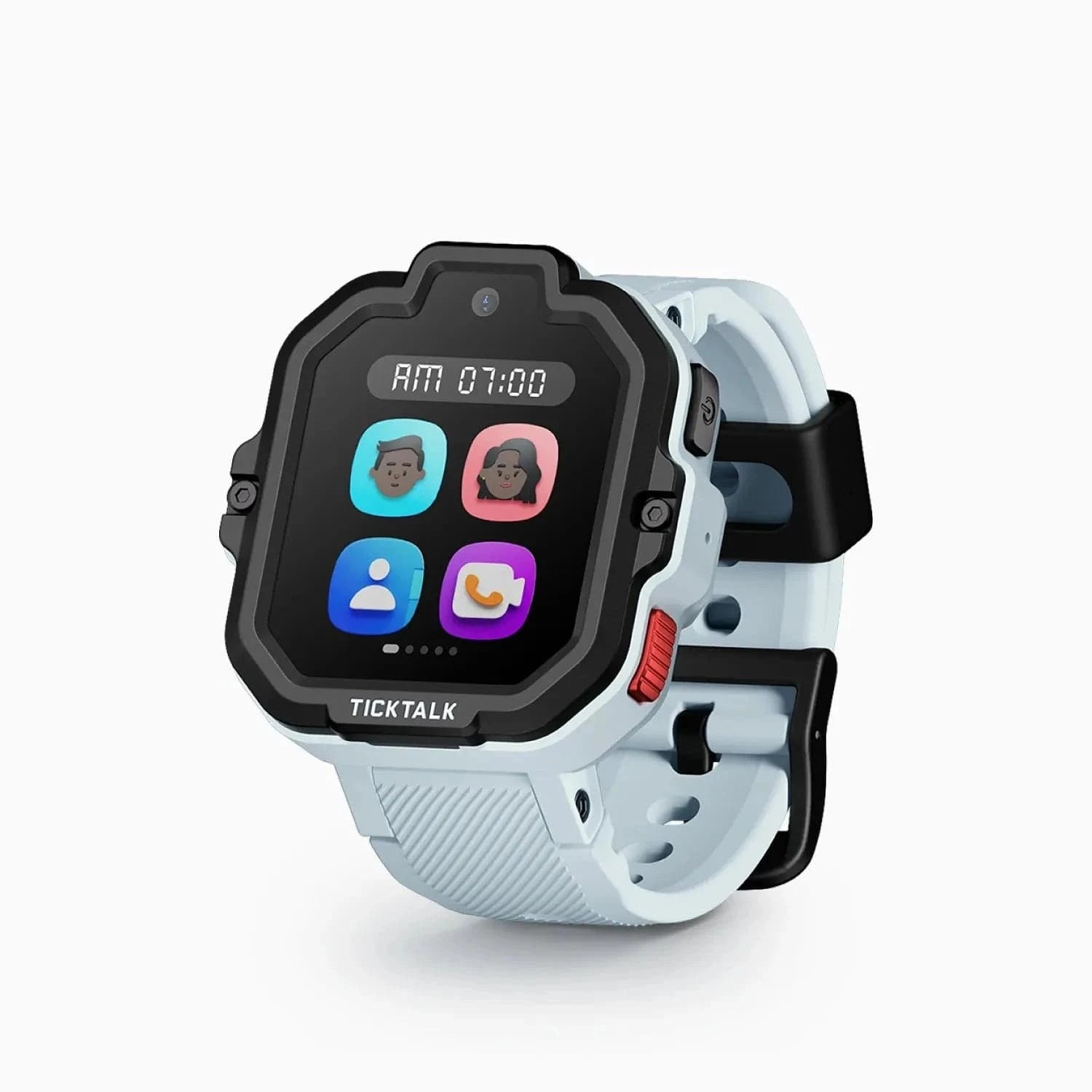
TickTalk 5
$159.99· 4.3/5 rating
| # | Watch | Price | Rating | Ages | Best For | |
|---|---|---|---|---|---|---|
| 1 | TickTalk 5Top Pick | $159.99 | ★★★★☆ 4.3 | 3-12 | Best Camera Overall | |
| 2 | COSMO JrTrack 5 | $129.99 | ★★★½☆ 3.5 | 4-12 | Best Budget Camera Watch | |
| 3 | Xplora X6Play | $169.99 | ★★★½☆ 3.8 | 5-12 | Best Photo Quality | |
| 4 | VTech KidiZoom DX3 | $69.99 | ★★★½☆ 3.5 | 4-12 | Best for Young Kids (No Cell Plan) |
Prices may vary. As an Amazon Associate we earn from qualifying purchases.
Affiliate Disclosure: This article contains Amazon affiliate links. If you purchase through these links, we earn a small commission at no extra cost to you. We only recommend products we've personally tested and believe in. Our opinions are our own.
Top pick: The TickTalk 5 ($159.99) is the best kids smartwatch with a camera -- its 5MP sensor and smooth video calling beat everything else we tested. On a budget, the COSMO JrTrack 5 ($129.99) gets you a camera plus voice calls for $30 less, and the Xplora X6Play ($169.99) takes the best still photos of the bunch.
Here's something I didn't expect when I started testing kids smartwatches: the camera is the feature my kids ask about first. Not GPS. Not calling. Not games. They want to know if it can take pictures and, more importantly, if they can video call mom or dad.
I get it. These kids have grown up watching us FaceTime grandparents and hop on Zoom calls. Of course they want that on their wrist. The question is -- which watches actually deliver a decent camera experience, and which ones are basically strapping a webcam from 2005 to your kid's arm?
I spent the last several weeks testing every kids smartwatch with a camera I could get my hands on. My daughter Lily (age 7) and my son Jake (age 11) were enthusiastic co-testers. We took hundreds of photos, made dozens of video calls, and put every camera through its paces indoors, outdoors, and in that tricky mixed lighting that seems to exist everywhere kids actually spend their time.
Here's what we found.
Before diving into the details, here's a side-by-side look at the camera features across all four watches:
| Feature | TickTalk 5 | COSMO JrTrack 5 | Xplora X6Play | VTech KidiZoom DX3 |
|---|---|---|---|---|
| Camera Resolution | 5MP | 2MP | 5MP | 0.3MP |
| Video Calling | Yes | No | Yes | No |
| Photo Sharing | Yes (app) | Yes (app) | Yes (app) | No |
| Selfie Camera | Yes | Yes | Yes | Yes (dual cameras) |
| Photo Effects/Filters | No | No | No | Yes |
| Photo Storage | Watch + App | Watch + App | Watch + App | Watch only |
| Requires Cell Plan | Yes | Yes | Yes | No |
| Price | $159.99 | $129.99 | $169.99 | $69.99 |
Now let's break down what each of these watches actually delivers in real-world use.
The TickTalk 5 has been our top-rated kids smartwatch for a while now, and a big part of that is the camera experience. The 5MP sensor produces photos that are genuinely decent -- not phone-quality, but far beyond what you'd expect from something on a kid's wrist.
What really sets it apart is video calling. When Lily calls me from after-school care, the video is smooth and the audio is clear. There's a slight delay, maybe half a second, but it's consistent and predictable. She figured out the calling interface on her own within about ten minutes of unboxing the watch, which tells you something about the design.
The front-facing camera angle is actually well thought out. When kids hold their arm up to make a video call, the camera catches their face naturally. I've used other watches where the camera angle is so awkward that you're mostly looking at a kid's forehead or the ceiling.
Battery life does take a hit with camera use. TickTalk advertises 48 hours, and that's roughly accurate for normal use. But if your kid is making multiple video calls a day and snapping photos constantly, you're looking at more like 30-36 hours. Still fine for getting through a school day and into the evening.
The photo quality surprised me. Outdoor shots in good light have decent color and sharpness. Indoor shots are noisier, as you'd expect from a tiny sensor, but still recognizable and usable. Lily has taken some genuinely cute photos of the family dog that I've actually saved to my phone.
Bottom line: If camera quality and video calling are priorities, this is the one to get. The total cost of ownership is higher (watch price plus monthly plan), but the camera experience justifies it for families who want that visual connection throughout the day.
The COSMO JrTrack 5 comes in $30 cheaper than the TickTalk 5 and pairs voice calling with a basic 2MP photo camera. That price difference matters when you're buying a watch that might end up in a toilet (ask me how I know).
The camera is a 2MP sensor, and you can tell the difference from the TickTalk's 5MP. Photos are softer, colors are a bit more washed out, and indoor shots get muddy fast. But here's the thing -- for casual, in-the-moment snapshots, the quality difference matters less than you'd expect. On a 1.4-inch watch screen, 2MP is honestly fine for the quick photos your kid grabs and shares with you through the app. (Note that the JrTrack 5 handles voice calls, not live video calls -- if face-to-face calling matters, look at the TickTalk 5 or Xplora.)
The photo sharing to the parent app works well. My wife appreciated being able to see what Jake was photographing during the day without having to ask him to show her later. It's a small thing, but it creates these little moments of connection.
The smaller display does make framing harder for kids. Jake would sometimes accidentally cut off the top of his head or get his thumb in the shot. Lily, with smaller fingers, actually had an easier time with it. Something to consider depending on your kid's age and dexterity.
Battery life is the main weakness. Heavy photo-taking and voice calling drain the JrTrack 5 noticeably faster than the TickTalk 5. If your kid is snapping photos and calling constantly, you might need to charge before bedtime. For occasional check-ins, it's perfectly fine.
Bottom line: The best option if you want a camera and voice calling without spending top dollar. Just know it does voice calls, not live video calls -- the camera is for photos. The camera quality gap is real but matters less than you'd think for casual day-to-day snapshots.
Here's an interesting one. The Xplora X6Play has a 5MP camera that arguably produces the best still photos of any watch on this list -- the color accuracy is noticeably better than the TickTalk 5 in some lighting conditions. But video calling is where it gives ground to the TickTalk 5.
The X6Play does support video calling, but the experience isn't quite as polished as the TickTalk 5 -- the video is a bit choppier and the interface less intuitive. Where it really shines is still photos, which you can view in the parent app.
The GoPlay rewards system is a nice touch -- kids earn points for being active, which they can redeem in the Xplora app. It's a clever way to gamify fitness, and it gives the watch more purpose beyond just being a phone-on-the-wrist.
For families where photo-taking is the priority and video calling isn't essential, the X6Play is a strong choice. Jake used it for a week and took some genuinely impressive photos for a watch -- a sunset at the park, close-ups of bugs he found (thanks, buddy), and a panoramic attempt at his school playground that came out better than I expected.
Bottom line: The best still photos on this list, plus functional video calling. If your kid wants to snap pictures and share them with you, and you don't need face-to-face calls from the watch, this is a solid option at a reasonable price.
The VTech KidiZoom DX3 is in a completely different category from the other watches on this list. It's not a connected smartwatch -- there's no GPS, no calling, no messaging. It's a toy watch with cameras. And honestly, for kids ages 4-7, that's exactly what some families need.
The dual camera setup (one selfie, one outward-facing) is unique on this list. And the photo effects and filters are genuinely fun. Lily spent an entire afternoon giving everyone in the family monster faces, cartoon eyes, and various animal ears. She was absolutely delighted.
Camera quality? Let's be real -- 0.3MP is barely a camera by modern standards. The photos are blurry, pixelated, and pretty much useless for anything other than in-the-moment fun on the watch's small screen. You can't share them to an app or transfer them easily. They live and die on the watch.
But at $69.99 with zero monthly fees, the KidiZoom DX3 serves a specific purpose. It's a first "smartwatch" for young kids who want to feel like they have cool tech, without any of the connectivity concerns that come with a real GPS watch. It's also a great way to test whether your kid will actually wear a watch before investing $150+ in a cellular model.
Bottom line: Not a real smartwatch, but a fun camera toy for young kids. Great entry point before upgrading to a connected watch. Check out our best kids smartwatches with no monthly fee guide for more options in this category.
It's worth noting that several excellent kids smartwatches don't have cameras at all -- and there are good reasons parents choose them anyway.
Garmin Bounce 2 -- Focused on fitness tracking and GPS. No camera, but the best activity tracking and durability of any kids watch. If your kid is active in sports, the Bounce 2 is hard to beat for what it does.
Apple Watch SE -- Has all the connectivity you could want, but Apple deliberately left the camera off the Watch entirely (even the adult versions). You get calling, messaging, and GPS, plus the Apple ecosystem integration. Many parents prefer this for older kids who don't need a camera.
Gabb Watch -- Gabb's whole philosophy is about simplifying technology for kids. No camera, no games, no internet -- just calls, texts, and GPS. For parents who want maximum safety with minimum distraction, this is the approach.
Bark Watch -- Similar to Gabb in philosophy. Bark focuses on digital safety tools, and the watch is deliberately stripped of features like cameras that could create concerns around photo sharing or inappropriate content.
Some parents specifically don't want a camera on their kid's watch, and that's a completely valid choice. Schools sometimes ban camera devices, and there are legitimate privacy concerns about kids taking photos of other people's children. If your school has a no-camera policy, any of these camera-free watches are worth considering. For a broader look at all the options, check out our best kids smartwatches for 2026 roundup.
Let me set some expectations here, because "video calling" on a kids watch is not the same experience as FaceTime on an iPhone.
The screen is tiny. Even the largest kids watch screen is under 2 inches. You can see your kid's face, they can see yours, but nobody's watching a movie on this thing.
Audio quality varies. The TickTalk 5 has the best audio of the bunch -- clear enough for a real conversation. The COSMO JrTrack 5 is adequate but can get tinny in noisy environments. Both require a decent cellular signal.
It depends on connectivity. Video calling requires 4G LTE, which means a monthly plan ($5-15/month depending on carrier). It also means the watch needs a strong signal. In my testing, video calls in buildings with thick walls or poor cell coverage would drop or pixelate badly.
Kids get bored of it. Here's the honest truth -- both of my kids were obsessed with video calling for the first two weeks, then it became just another feature. They still use it, but usually for quick check-ins rather than extended conversations. Don't buy a camera watch solely for video calling and expect it to be a daily event.
One thing that surprised me during testing was how different each watch handles photo storage:
Not directly, on any of the watches we tested. Kids can take photos and share them to the parent app, but there's no watch-to-watch photo sharing feature. This is actually by design -- it prevents kids from sharing photos with unknown contacts.
The TickTalk 5 and Xplora X6Play can record short video clips in addition to taking photos. The quality is similar to their still photo quality -- acceptable outdoors, grainy indoors. Storage fills up fast with video, so most kids stick to photos.
This varies by school and district. Some schools ban all camera devices, which would include camera watches. Others allow smartwatches but require the camera to be disabled during school hours. Check your school's specific policy before buying. Both the TickTalk 5 and COSMO JrTrack 5 have "school mode" settings that can disable the camera during designated hours.
All the connected watches (TickTalk, COSMO, Xplora) sync photos to the parent app, so you can see everything your child photographs. This visibility is usually enough to keep things appropriate. You can also have a conversation about responsible camera use before handing over the watch -- just like you would with any camera device.
Honestly, yes -- the TickTalk 5 produces video clear enough for grandparents to see their grandchild's face and have a conversation. It's not HD video, but it gets the job done and grandparents tend to be thrilled with any video call from a grandkid, quality be damned. (The COSMO JrTrack 5 does voice calls only -- no live video -- so it's not the pick if grandparents want to see the grandkids.)
After weeks of testing, here's my straightforward recommendation:
Want the best camera and video calling? Get the TickTalk 5. It's the most complete package -- best photo quality among connected watches, smooth video calling, and solid battery life. The $159.99 price plus monthly plan is the cost of entry for a genuinely good camera watch.
Want a camera on a budget? The COSMO JrTrack 5 gets you a camera plus voice calling for $30 less. It doesn't do live video calls -- for budget video calling, the TickTalk 5 is the better bet -- but for cheap photos and voice check-ins, it delivers.
Want the best photos? The Xplora X6Play takes excellent stills for a watch. Its video calling isn't as smooth as the TickTalk 5's, but if photos are the priority, it delivers.
Want a camera toy for a young kid? The VTech KidiZoom DX3 is harmless fun at $70 with no monthly fees. Just know it's a toy, not a smartwatch.
And if you decide a camera isn't necessary? That's a perfectly reasonable conclusion. Some of the best kids smartwatches of 2026 skip the camera entirely and focus on GPS, calling, and durability instead. There's no wrong answer here -- just the right fit for your family.
Want to see your kid's face, not just hear them? These are the only kids smartwatches with real video calling — compared on quality, camera, and value.
Want your child to call and text from their wrist without a phone? These 6 kids smartwatches with 4G calling keep families connected. Tested and ranked.
Tired of a dead watch at pickup? These kids smartwatches have the longest battery life — from 2-day GPS watches to a fitness tracker that lasts a year.
Which kids smartwatches give parents the most control? We rank the watches with the best parental controls — from content monitoring to airtight school mode.
Want a kids smartwatch that plays music? These are the only ones with real music streaming — iHeartRadio, Spotify Kids, and Amazon Music — compared honestly.
New review alerts, deal drops, and seasonal buying guides — delivered weekly. No spam, unsubscribe anytime.
No spam. Unsubscribe anytime.