Comparisons|
Apple Watch SE vs Xplora X6Play for Kids (2026): Which Wins?
Apple Watch SE 3 vs Xplora X6Play as a kids watch: we compare phone requirements, camera, video calling, battery, safety, and price to help you choose.
TickTalk 4 vs Xplora X6Play head-to-head comparison. We tested both kids smartwatches side-by-side to help you pick the right one.
Affiliate Disclosure: This article contains affiliate links. If you purchase through our links, we may earn a small commission at no extra cost to you. This helps support our testing and keeps the site running for families like yours. All opinions are 100% our own -- we purchased both watches with our own money and have no sponsorship relationship with TickTalk or Xplora.
Update (September 10, 2026; revised October 5, 2026): TickTalk 6 pre-orders are now open at $169.99. TickTalk originally said it would ship by the end of September 2026; it now expects to ship by October 5, 2026, and it is still on pre-order. It brings a 1.6" AMOLED display (320 x 360), a 5MP camera and IP68 water resistance — but its built-in eSIM requires a TickTalk Wireless plan at $9.99 or $19.99 a month, so you can no longer bring your own AT&T or T-Mobile SIM. TickTalk's own store has sold out of the TickTalk 5, which is still available on Amazon at $159.99. Our TickTalk 6 first look has the full published specs and the real monthly cost.
Update (June 2026): The TickTalk 4 has been discontinued; its successor is the TickTalk 5, which is what our TickTalk links now point to and which we recommend over the TickTalk 4. The head-to-head below reflects the TickTalk 4 we tested, but the TickTalk verdict applies to the TickTalk 5 — it improves on the 4 with longer battery life and more accurate GPS while keeping the same video calling strength.
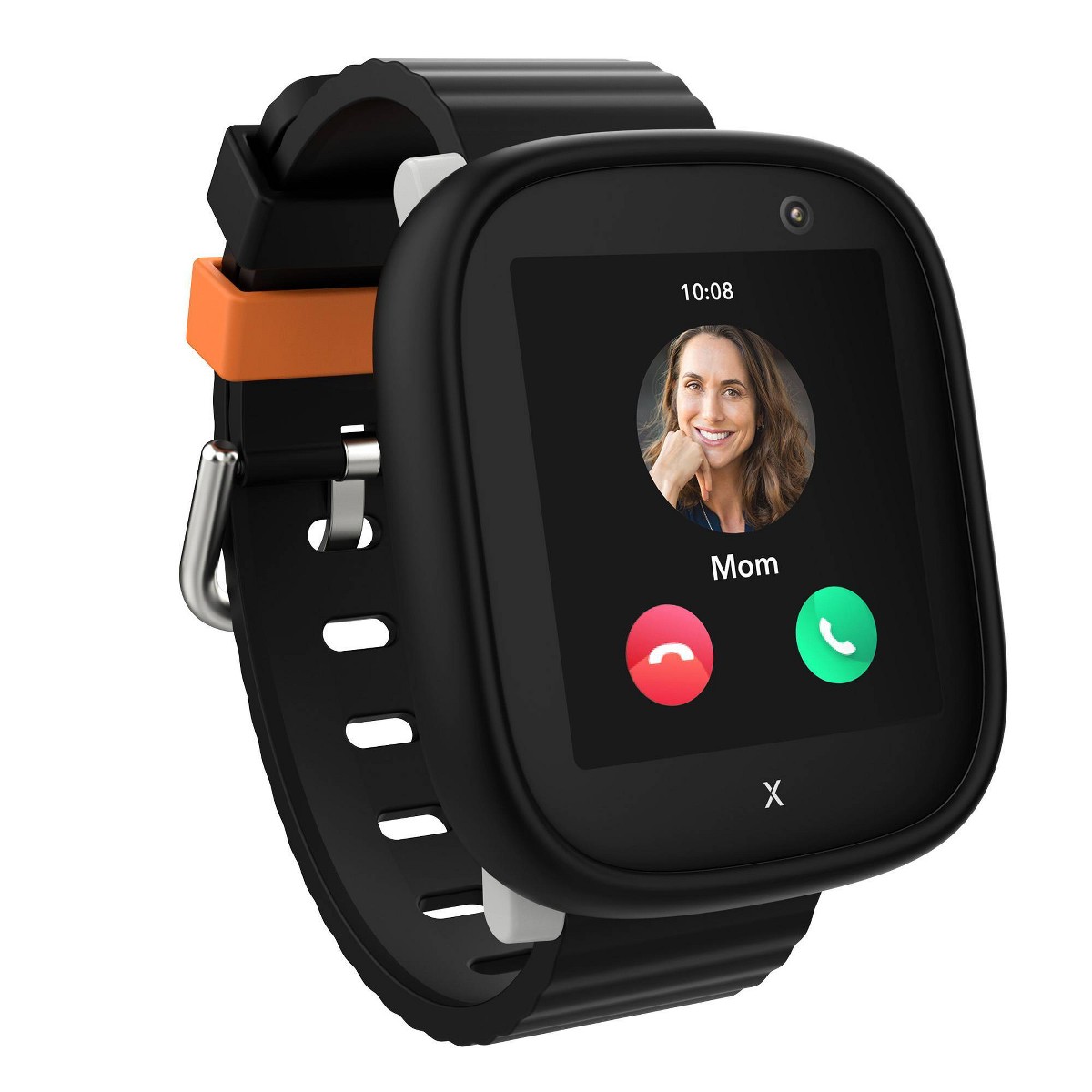
The TickTalk 4 and the Xplora X6Play are the two kids smartwatches I get asked about the most. And I understand why. Both are 4G-enabled watches aimed at the same 5-to-12 age range. Both promise GPS tracking, calling, cameras, and parental controls. Both sit at a similar price point. From a spec sheet, they look nearly interchangeable.
They are not. I strapped both watches on our test kids for six weeks of side-by-side testing -- the TickTalk 4 on our 9-year-old tester, the Xplora X6Play on our 10-year-old tester -- and measured real differences in call quality, GPS accuracy, battery life, display performance, and the daily parent experience. If you are choosing between these two watches and want data instead of guesswork, this is the comparison I wish existed when I was shopping.
For the full standalone breakdown of each watch, you can read our TickTalk 4 review and Xplora X6Play review. This article is specifically about how they compare head-to-head.
The TickTalk 4 wins on camera versatility, streaming music, and GPS precision. The Xplora X6Play wins on display quality, battery life, parental app experience, and its activity reward ecosystem. Both are excellent watches, and both support built-in video calling. Here is how to choose quickly:
Choose the TickTalk 4 if your child wants two cameras for creative photo-taking, you value the iHeartRadio music streaming integration, or you want iMessage compatibility and the small GLONASS edge in outdoor GPS accuracy.
Choose the Xplora X6Play if you want a sharper display, longer battery life, a more polished parent app, the Goplay activity rewards system, or a slightly lower total cost.
If you need more than that, read on. I have a lot of data to share.
Before we break down each category, here is the full side-by-side specification table. I collected these numbers from the manufacturers and verified what I could through testing.
| Feature | TickTalk 4 | Xplora X6Play |
|---|---|---|
| Price | $169.99 | $169.99 |
| Display Size | 1.4" IPS LCD | 1.52" TFT |
| Display Resolution | 240 x 240 | 360 x 400 |
| Processor | Qualcomm Snapdragon Wear 2500 | Qualcomm Snapdragon Wear 2500 |
| Connectivity | 4G LTE, Wi-Fi, Bluetooth 4.2 | 4G LTE, Wi-Fi, Bluetooth 4.2 |
| Front Camera | 5MP wide-angle | 5MP |
| Second Camera | 2MP side-facing | None |
| Video Calling | Yes (built-in) | Yes (built-in) |
| Music Streaming | Yes (iHeartRadio Family) | No |
| Voice Messaging | Yes | Yes |
| iMessage Compatible | Yes | No |
| GPS Type | GPS + GLONASS + Wi-Fi + LBS | GPS + A-GPS + Wi-Fi + LBS |
| Battery Capacity | 750 mAh | 800 mAh |
| Battery Life (tested) | 1-1.5 days | 1-1.5 days |
| Water Resistance | IPX7 | IP68 |
| Dimensions | 54 x 44 x 16 mm | 52 x 43 x 15 mm |
| Weight (with band) | 56g | 58g |
| Band Material | Medical-grade silicone | Food-grade silicone |
| SOS Button | Yes | Yes |
| School Mode | Yes | Yes |
| Step Counter | Yes | Yes (with Goplay rewards) |
| Geofencing | Yes | Yes |
| Compatible Carriers | T-Mobile, AT&T | T-Mobile, AT&T |
| Monthly Plan Cost | ~$9.95-$14.95/mo | ~$9.95-$12.95/mo |
Same processor. Same connectivity. Nearly identical GPS positioning strategies. The real differences live in the display, camera configuration, communication features, battery life, and software ecosystems. Let me break each one down with actual test data.
Both watches share the same basic design language -- a rounded rectangular case with a touchscreen and a silicone band. At arm's length, most people would not tell them apart. Up close, the differences matter.
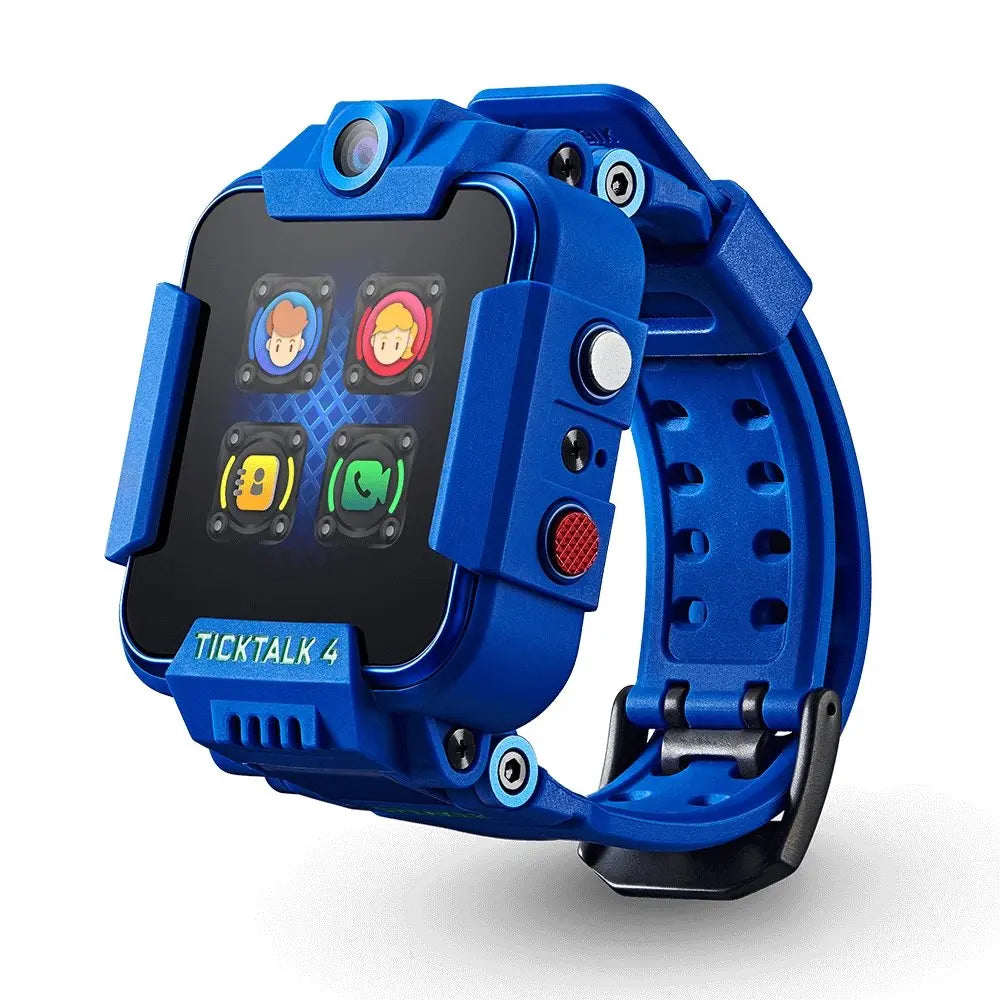
The TickTalk 4 is 2mm taller and 1mm thicker than the X6Play, mostly because of the side-mounted camera housing that creates a small bump on the right edge. Despite that, it is 2 grams lighter at 56g. Our 9-year-old tester never complained about the bump, but I could feel the asymmetry when I tried the watch myself. The medical-grade silicone band is soft and held up beautifully over six weeks -- no cracking, no discoloration, no skin irritation. The pin buckle closure is secure and simple enough for a 7-year-old to operate independently.
The Xplora X6Play feels marginally more refined in hand. The case is thinner, the profile is more uniform with no camera bump, and the band has a subtly smoother texture. At 58g, it is technically heavier by 2 grams, but the weight distribution feels more even on the wrist. Our 10-year-old tester wore the X6Play through soccer practice, art class, and the first two weeks of bedtime (she refused to take it off) without a single comfort complaint.
Both bands offer enough adjustment holes to fit wrists from about age 5 through 12. Both use hypoallergenic silicone formulations. Neither watch caused any skin issues during our testing.
Category winner: Xplora X6Play, by a narrow margin. The thinner, more uniform case gives it a slight edge in daily wearability. But this is a close call -- if your child has a smaller wrist, the lighter TickTalk 4 may actually feel better. For the youngest kids in the target range, check our best GPS smartwatches for kids guide for more size-appropriate options.
This is one of the most visible differences between the two watches, and the Xplora X6Play has a clear advantage.
The TickTalk 4's 1.4-inch IPS LCD panel runs at 240 x 240 pixels. It is bright enough for outdoor use, the colors are accurate, and our 9-year-old tester never struggled to read it. But side by side with the X6Play, you can see the lower pixel density. Text is not quite as crisp. Menu icons are a touch softer. It gets the job done, but it does not impress.
The Xplora X6Play's 1.52-inch TFT display runs at 360 x 400 pixels. That is a substantial resolution advantage -- nearly three times the total pixel count. The result is noticeably sharper text, crisper icons, and more vibrant colors. Our 10-year-old could read small text and navigate menus with less squinting. Outdoor visibility was excellent on both watches, but the X6Play looked genuinely better on sunny afternoons.
For a kids smartwatch, display quality is not just about aesthetics. A clearer screen means kids navigate menus faster, read contacts more easily, and make fewer mis-taps. Over six weeks, our 10-year-old had noticeably fewer "Dad, I tapped the wrong thing" moments than our 9-year-old did on the TickTalk.
Category winner: Xplora X6Play, decisively. The larger screen with meaningfully higher resolution is the better daily experience for kids.
The TickTalk 4 has two cameras: a 5MP front-facing wide-angle lens for selfies and video calls, and a 2MP side-mounted camera for outward-facing shots. The Xplora X6Play has a single 5MP front-facing camera.
In well-lit conditions, both front cameras produce nearly identical results -- sharp enough to identify who is in the photo, reasonably color-accurate, but grainy when you zoom in or view on a larger screen. Neither camera will replace a phone, but that was never the point.
Where the TickTalk 4 gains an edge is versatility. The side camera, while only 2MP, lets kids photograph things they are looking at rather than just themselves. Our 9-year-old took roughly 350 photos over six weeks -- about 60% selfies with the front camera and 40% outward shots with the side camera. Most of the side camera shots were of the family dog, his Lego builds, and a few surprisingly decent landscape attempts from the car window.
The Xplora X6Play's single camera produces marginally better selfies in low-light conditions. I suspect Xplora's image processing is more aggressive with noise reduction, which smooths out grain at the cost of some fine detail. In daylight, the difference is negligible.
Our 10-year-old took about 400 photos with the X6Play, nearly all selfies or close-range shots of friends. She never expressed frustration about having only one camera -- she just turned her wrist to aim at whatever she wanted to photograph. It worked fine. But the 9-year-old's ability to snap a quick photo of something interesting without contorting his wrist was a genuine practical advantage.
Category winner: TickTalk 4. Two cameras beat one for versatility, even though the X6Play's single camera is marginally better in low light. For kids who love photography, the side camera matters.
GPS tracking is the reason most parents buy these watches, so I spent the most time on this category. I tested both watches across five environments over the six-week testing period, comparing reported positions against my phone's GPS in real time.
| Environment | TickTalk 4 Avg. Accuracy | Xplora X6Play Avg. Accuracy |
|---|---|---|
| Park / open field | 5-10 meters | 6-12 meters |
| Suburban streets (clear sky) | 8-12 meters | 9-14 meters |
| Urban downtown | 15-30 meters | 18-35 meters |
| Indoor (school building) | 25-50 meters (Wi-Fi assist) | 20-45 meters (Wi-Fi assist) |
| Shopping mall | 30-60 meters | 25-50 meters |
The TickTalk 4 uses GPS + GLONASS satellite positioning, giving it access to a larger pool of satellites for triangulation. The Xplora X6Play uses GPS + A-GPS (assisted GPS). In clear-sky outdoor conditions, the TickTalk 4 was consistently 1-3 meters more precise. That GLONASS advantage shows up reliably in the data.
Indoors, the story flips. The Xplora X6Play's Wi-Fi positioning seemed to lock onto indoor access points slightly faster, which gave it a small accuracy advantage inside school buildings and shopping malls. At a crowded Saturday mall trip, the X6Play placed our tester within 25-50 meters versus the TickTalk's 30-60 meters.
For practical parenting purposes, both watches provided accuracy that was more than good enough. I always knew which building my kid was in, which part of a park they were playing at, and whether they had crossed a geofenced boundary. Neither watch gives you room-level accuracy indoors -- that is a limitation of GPS technology at this size and price point, not a flaw in either product.
Category winner: Draw. The TickTalk 4 is slightly better outdoors. The Xplora X6Play is slightly better indoors. For real-world parenting, the net difference is negligible.
This is where the two watches diverge most significantly, and it is likely the category that will tip your decision one way or the other.
Both watches support built-in video calling, and both handled it well in our testing. On the TickTalk 4, the 5MP front camera provides a clear enough image for the watch's small screen, and call quality over 4G LTE was surprisingly solid. Our 9-year-old video-called parents and grandparents regularly during our testing. The experience felt closer to a FaceTime call than I expected -- there is about a half-second of latency, and video gets choppy on weak signal, but under normal conditions it simply works.
Beyond video calling, the TickTalk 4 supports standard 4G voice calls to approved contacts, voice-to-text messaging, preset text responses, and voice messages. It also supports iMessage compatibility, meaning it can receive iMessages from iOS contacts -- a genuine convenience if your family is all-in on Apple devices.
One unique bonus: the TickTalk 4 integrates iHeartRadio Family for music streaming. Our tester used it occasionally during car rides and while doing homework. It is not a replacement for a dedicated music player, but having any music capability at all on a kids smartwatch is uncommon and puts the TickTalk in its own class.
The Xplora X6Play supports 4G voice calling to approved contacts and offers a clean, intuitive voice messaging system. Our 10-year-old sent 5-10 voice messages per day versus 1-2 actual phone calls -- it became her default communication method within the first week. The interface is dead simple: one button press to record, release to send.
Where the X6Play truly shines in communication is the parent app's chat interface. It feels like a simplified iMessage thread with voice messages, emoji reactions, and a conversational flow that feels natural. For day-to-day parent-child messaging, the Xplora's approach felt more fluid and more like a real conversation than what the TickTalk app offers.
Where the TickTalk 4 pulls ahead in communication is not video calling -- both watches do that -- but the extras layered on top. The TickTalk 4 is the only one of the two with iHeartRadio Family music streaming, and it is the only one that offers iMessage compatibility, so it can receive iMessages from iOS contacts. If your family is all-in on Apple devices or your child wants music from their wrist, those are meaningful points in the TickTalk 4's favor that the X6Play cannot match.
Both watches support an SOS button that sends location data to emergency contacts and cycles through calls until someone answers. Both restrict all communication to parent-approved contacts only. No strangers can call in. No kids can dial random numbers.
Category winner: TickTalk 4 if music streaming and iMessage compatibility matter. Xplora X6Play if voice messaging is your daily communication style. Both watches handle video calling, so that is not the deciding factor here. In our testing household, video calling was exciting for the first two weeks and then tapered off to a weekly grandparent call. Voice messaging stayed a daily habit for the full six weeks, and the iHeartRadio music streaming remained a nice TickTalk-only bonus. Your family's communication patterns should drive this decision.
Both watches take safety seriously, and neither cuts corners on the core protections parents need.
SOS functionality works identically on both watches. A long press on the physical button triggers an alert with the watch's current GPS coordinates, then auto-dials up to three preset emergency contacts in sequence until someone answers. I tested SOS on both watches multiple times. Both delivered alerts to my phone within 5-10 seconds and initiated calls immediately. Zero failures across all tests.
Geofencing is available on both watches through their respective parent apps. You draw a virtual boundary on the map, name the zone, and receive notifications when your child enters or leaves. In my testing, the TickTalk 4's geofence alerts arrived within 1-2 minutes of the actual boundary crossing. The Xplora X6Play's alerts were slightly slower, typically 1-3 minutes, with occasional delays of up to 4 minutes. Neither watch ever missed a geofence event entirely during our testing -- the alerts always came through eventually.
School mode is where the Xplora X6Play has a subtle but meaningful advantage. Both watches disable all interactive functions except time display and the SOS button during scheduled school hours. But the Xplora app lets you configure different schedules for each day of the week and choose whether step counting remains active during school mode -- so kids can earn Goplay coins at recess without having full watch access during class. The TickTalk 4's school mode is clean and effective but less granular in its scheduling options.
Approved contacts work identically on both watches. Parents manage the contact list through the companion app, and the watch can only communicate with numbers you have explicitly approved. No one outside that list can reach your child.
Category winner: Draw on core safety features. The Xplora X6Play has a slight edge on school mode flexibility, which matters for families with rotating schedules or kids in after-school programs on certain days.
I tracked battery performance daily across the full six-week testing period. Both watches were charged overnight and worn from morning drop-off (~7:30 AM) through bedtime (~8:30 PM).
| Metric | TickTalk 4 | Xplora X6Play |
|---|---|---|
| Battery Capacity | 750 mAh | 800 mAh |
| Average Daily Drain (normal use) | 68-78% | 55-68% |
| Days Between Charges | 1-1.5 days | 1-1.5 days |
| Charge Time (0 to 100%) | ~90 minutes | ~80 minutes |
| Heavy Use Endurance | Dead by ~5-6 PM | Dead by ~7-8 PM |
Normal use means GPS polling every 10 minutes, a few voice calls or messages, occasional camera use, and no video calling.
The Xplora X6Play's larger 800 mAh battery, combined with the absence of a second camera, gives it a consistent endurance advantage. On average, the X6Play had 10-15% more charge remaining at the end of the day compared to the TickTalk 4. That gap does not sound dramatic, but on heavy-use days -- field trips, lots of photos, frequent calls -- the TickTalk 4 occasionally needed a midday charge while the X6Play always made it through to bedtime.
Both watches require nightly charging. Neither will reliably make it through two full days of moderate use. That is the trade-off for 4G cellular connectivity and active GPS polling on a device this small. If battery endurance is your top priority, our best GPS smartwatches for kids roundup covers options with multi-day battery life.
Category winner: Xplora X6Play. The margin is small but consistent, and it made a practical difference on our busiest days.
The parent app is where you will spend most of your time managing the watch. This category matters more than most comparison articles give it credit for, because a frustrating app can sour the entire ownership experience.
The TickTalk app (iOS and Android) is functional but has rough edges. The home screen shows your child's location on a map with quick access to calling, messaging, and settings. GPS history appears in a timeline view. Geofence management is straightforward -- draw a circle, name it, set notifications.
Where the app struggles is navigation and polish. Settings are scattered across multiple menus with inconsistent labeling. The school mode toggle took me three taps to find the first time. The notification system is noisy -- I received duplicate alerts for the same geofence event on several occasions during testing. A firmware update in week three reduced the duplicates, but the UX still feels like it was designed by engineers who have not observed real parents using it under time pressure.
One unique TickTalk app feature worth mentioning: remote listen-in, which lets parents hear the watch's surroundings through the microphone. Whether you consider that a safety feature or a privacy concern is a personal call.
The Xplora app (iOS and Android) is the more polished experience. A bottom navigation bar puts the four most-used functions -- location, messages, phone, settings -- within one tap. The messaging interface looks and feels like a simplified iMessage thread, which makes daily conversations feel natural. GPS history is displayed as a breadcrumb trail on the map rather than a timeline, and I found this approach more intuitive for understanding a child's route throughout the day.
The Xplora app also integrates the Goplay activity rewards system, which gamifies physical activity by converting step counts into Xplora coins that can be spent on watch face customization and in-app rewards. Our 10-year-old tester was motivated by this system for about a month before the novelty wore off. Your child's engagement will depend on how reward-driven they are.
The Xplora app is not perfect -- location refreshes occasionally took 5-10 seconds, and I experienced two crashes over six weeks. But the core daily interactions (checking location, messaging, managing settings) are noticeably smoother than on the TickTalk app.
Category winner: Xplora app, clearly. More intuitive design, a better messaging experience, and smoother daily interactions. The TickTalk app works, but the Xplora app feels like it was designed with parents in mind.
Both watches require an active cellular plan to function. Without a SIM card and service, you have an expensive step counter that tells time. Here is the full cost breakdown parents need to see before making a decision.
| Cost Category | TickTalk 4 | Xplora X6Play |
|---|---|---|
| Watch Price | $169.99 | $169.99 |
| Lowest Monthly Plan | ~$9.95/mo | ~$9.95/mo |
| Typical Monthly Plan | ~$12/mo | ~$11/mo |
| Year 1 Total (watch + 12 months) | $289.39 - $313.99 | $289.39 - $301.99 |
| Year 2 Total (plan only) | $119.40 - $144.00 | $119.40 - $132.00 |
| 2-Year Total Cost of Ownership | $408.79 - $457.99 | $408.79 - $433.99 |
The Xplora X6Play now costs the same upfront ($169.99 on Amazon), so its edge is the plan: it tends to run $1-2 less per month on typical cellular plans. Over two years, that works out to up to about $25 in favor of the X6Play on the figures above. That is not a dramatic savings, but it is money you could put toward a screen protector and a spare charging cable -- both of which I recommend regardless of which watch you choose.
Both watches are compatible with T-Mobile and AT&T networks. Neither supports Verizon. If Verizon is your only carrier option, neither watch will work for you, and you will need to look at alternatives. For a comprehensive comparison of plan options across all major kids smartwatches, see our kids smartwatch monthly plans compared guide.
Category winner: Xplora X6Play. The savings are modest -- the hardware now costs the same, so the edge comes from the monthly plan and total cost of ownership.
The TickTalk 4 carries an IPX7 water resistance rating, which means protection against submersion in up to 1 meter of water for 30 minutes. The Xplora X6Play carries an IP68 rating, which means it is certified dust-tight (the "6") and protected against sustained water immersion beyond 1 meter (the "8").
In practice, both watches survived everything normal kid life threw at them over six weeks: hand-washing, rainstorms, splashed drinks, sweaty soccer practices, and an unfortunate mud puddle incident. I did not submerge either watch intentionally -- neither is a swim watch, and I would not recommend wearing either in a pool regardless of the technical rating.
Both watches survived drops onto grass, carpet, and hardwood floors without damage. Both cases feel solid in hand. Both screens are recessed enough to offer protection against flat-surface impacts. Neither watch uses sapphire crystal or tempered glass, so I strongly recommend a screen protector for whichever watch you buy.
The meaningful difference is dust protection. The "6" in IP68 means the Xplora X6Play is fully sealed against dust and particulate matter. The TickTalk 4's IPX7 rating includes an "X" for dust, meaning it simply was not tested or certified for dust ingress. If your child regularly plays in sand, dirt, or dusty environments, the X6Play's sealed design is the safer bet.
Category winner: Xplora X6Play. IP68 is a more comprehensive protection standard than IPX7, particularly the dust sealing component. In everyday use, the difference is subtle unless your child spends significant time in sandy or dusty conditions.
Here is a summary of every head-to-head category for quick reference:
| Category | Winner |
|---|---|
| Design & Comfort | Xplora X6Play (slight edge) |
| Display Quality | Xplora X6Play (clear win) |
| Camera | TickTalk 4 (dual camera versatility) |
| GPS Accuracy | Draw |
| Calling & Messaging | TickTalk 4 (music streaming + iMessage) / X6Play (voice messaging) |
| Safety Features | Draw (Xplora edges on school mode) |
| Battery Life | Xplora X6Play |
| Parent App | Xplora X6Play (clear win) |
| Monthly Cost / TCO | Xplora X6Play |
| Durability / Water Resistance | Xplora X6Play |
The Xplora X6Play wins or ties in more categories. But the TickTalk 4's wins -- dual-camera versatility, iHeartRadio music streaming, and iMessage compatibility -- carry outsized importance for the right family.
The TickTalk 4 is the right watch for your family if:
For the full standalone deep dive, read our complete TickTalk 4 review.
The Xplora X6Play is the right watch for your family if:
For the full standalone deep dive, read our complete Xplora X6Play review.
After six weeks of simultaneous testing with real kids in real daily life, here is my honest bottom line.
The Xplora X6Play is the better all-around kids smartwatch for most families. It wins more head-to-head categories, costs less over time, has a noticeably better display, lasts longer on a single charge, and offers a more polished parent app experience. If I had to recommend one watch to a parent who did not have a specific feature requirement, I would recommend the X6Play. It earns a 4.3 out of 5 rating.
The TickTalk 4 is the better kids smartwatch for families who want dual cameras, value iHeartRadio music streaming, or need iMessage compatibility. That combination of camera versatility and music streaming is enough to swing the entire decision for the right family, because the TickTalk 4 offers extras the single-camera X6Play cannot. It earns a 4.5 out of 5 rating -- a higher score that reflects its unique feature set and the value of its dual-camera and music-streaming capabilities for families who actually use them.
Your decision comes down to one question: Are the TickTalk 4's dual cameras and music streaming worth trading the X6Play's advantages in display, battery life, cost, app quality, and durability?
For our test family, the answer was situational. The 10-year-old kept wearing the X6Play as her everyday watch after testing ended, because the screen was better, the battery lasted longer, and she preferred the voice messaging workflow. But the 9-year-old's grandma, who lives several states away and waves at him through a tiny watch screen twice a week, would tell you the TickTalk 4 was worth every penny.
Both are excellent watches. Neither is a bad choice. But now you have the data to pick the right one for your family. And if neither of these watches is quite right, our best GPS smartwatches for kids roundup covers the full market, and our Garmin Bounce vs Xplora X6Play comparison is worth reading if you are also considering a more rugged, fitness-focused alternative.
Yes -- both watches accept nano-SIM cards and are compatible with T-Mobile and AT&T networks in the United States. If you already have a data line on either carrier, you can typically add a watch line for $5-15 per month depending on your plan. Neither watch supports Verizon. For a full breakdown of plan options and pricing, see our kids smartwatch monthly plans compared guide.
Both are on the large side for a younger child's wrist. The TickTalk 4 is 2 grams lighter (56g vs 58g), which may make it marginally more comfortable for smaller arms. But honestly, if your child is closer to 5 or 6, I would recommend checking our best GPS smartwatches for kids guide for smaller, lighter options. The Garmin Bounce, for example, weighs only 37g and is better suited to younger wrists.
Neither watch has downloadable apps, games, a web browser, or social media access. This is intentional and, in my opinion, one of the best things about both watches. The Xplora X6Play has the Goplay rewards system that gamifies step counting, but it is an activity motivator rather than a game. Both companies have designed these as communication and safety tools, not entertainment devices.
Both watches support messaging, but not traditional keyboard typing. The TickTalk 4 offers preset text responses, voice-to-text transcription, voice messages, and iMessage compatibility for receiving texts from Apple devices. The Xplora X6Play offers preset responses, emoji reactions, and voice messages. On both watches, voice messages ended up being the most practical and most-used communication method -- typing on a 1.4 to 1.5-inch screen is simply not realistic for anyone.
Indoor GPS accuracy drops significantly on both watches. In my testing, the TickTalk 4 averaged 25-50 meter accuracy indoors, while the Xplora X6Play averaged 20-45 meters. Both watches supplement satellite GPS with Wi-Fi positioning and cell tower triangulation (LBS) when indoors. You will reliably know which building your child is in, but not which room they are in. This is a limitation of the technology at this size and price point, not a flaw in either watch.
Based on build quality from our testing, I would expect 2-3 years of usable life from either watch under normal kid conditions. Battery capacity will degrade over time as all lithium-polymer batteries do, and the charging port or screen will likely be the eventual failure point. Both watches use proprietary magnetic charging cables, so losing the charger is a real concern -- I recommend buying a spare for whichever watch you choose on day one.
For kids under 11, I firmly believe a smartwatch is the better choice. This is the question I get asked the most. It provides the communication and safety features parents want without the distraction, social media exposure, and screen-time problems that come with a smartphone. The TickTalk 4 and Xplora X6Play both occupy a sweet spot -- enough connectivity for safety and communication, without the open-ended internet access that makes smartphones problematic for young kids.
No -- both the TickTalk 4 and Xplora X6Play are compatible with T-Mobile and AT&T networks only. Neither watch supports Verizon. If Verizon is your only carrier option, you would need to add a separate T-Mobile or AT&T line for the watch, which typically costs about $10 per month. Check carrier coverage maps for your area before purchasing.
For the most current pricing on the TickTalk 4 and Xplora X6Play, visit our deals page.
Last updated: June 24, 2026. Prices and plan availability are subject to change. We will update this comparison as firmware updates, pricing changes, or new model releases affect either watch.
Apple Watch SE 3 vs Xplora X6Play as a kids watch: we compare phone requirements, camera, video calling, battery, safety, and price to help you choose.
Fitbit Ace LTE vs Xplora X6Play: we compare phone compatibility, video calling, fitness features, camera, battery, and swim-proofing to help you pick the right kids watch.
Samsung Galaxy Watch 7 vs Xplora X6Play as a kids watch: we compare phone requirements, geofencing, camera, video calling, and price to help you choose.
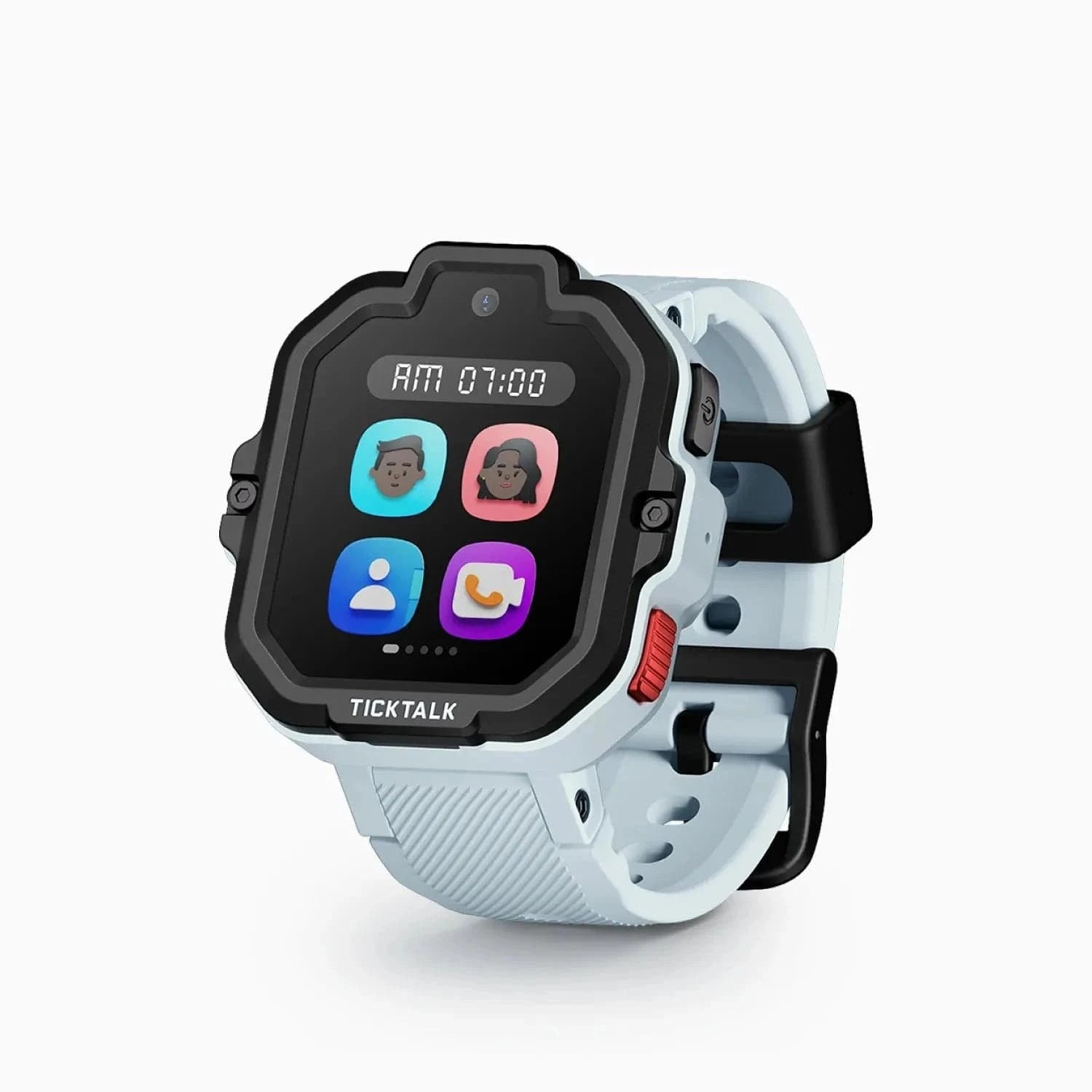
TickTalk 5 vs Xplora X6Play: we compare video calling, GPS accuracy, battery, school mode, and price to help you pick between two of the most popular kids watches.
Xplora X6Play vs Bark Watch: feature-rich fun vs. content-monitoring safety. We compare video calling, monitoring, GPS, cost, and availability to help you choose.
New review alerts, deal drops, and seasonal buying guides — delivered weekly. No spam, unsubscribe anytime.
No spam. Unsubscribe anytime.