Buying Guides|
Bark Watch vs TickTalk 5 (2026): Monitoring or Calling?
Bark Watch vs TickTalk 5: AI text monitoring for older kids versus HD video calling and value for younger ones. We break down GPS, camera, battery, and cost to name your winner.
Garmin Bounce 2 vs Bark Watch head-to-head comparison. We break down GPS accuracy, monthly costs, fitness tracking, parental controls, and which watch delivers the best value for your family.
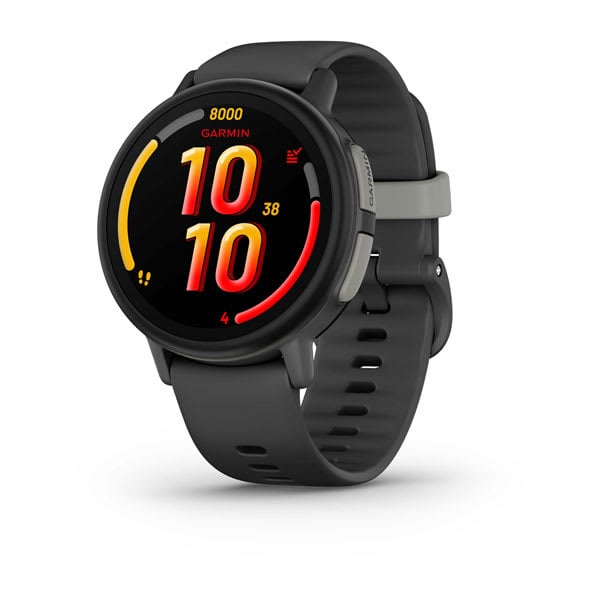
Garmin Bounce 2
$299.99· 4.3/5 rating
Affiliate Disclosure: This article contains affiliate links. If you purchase through our links, we may earn a small commission at no extra cost to you. This helps support our testing and keeps the site running for families like yours. All opinions are 100% our own -- we purchased both watches with our own money and have no sponsorship relationship with Garmin or Bark.
The Garmin Bounce 2 and the Bark Watch represent two very different answers to the same parenting question: "How do I keep my kid safe and connected without handing them a smartphone?" Both are safety-first devices. Neither has video calling. Neither is trying to be a miniature entertainment system on your child's wrist. But the way they approach safety, the features they prioritize, and especially what they cost over time are different enough that choosing the wrong one could mean spending hundreds of extra dollars on capabilities your family does not need.
The Garmin Bounce 2 costs $299.99 upfront but charges only $9.99 per month. The Bark Watch costs $169 upfront but charges $15 per month. That inverted cost structure -- higher hardware, lower plan versus lower hardware, higher plan -- makes the "which is cheaper" question surprisingly complicated. And cost is just the beginning. These watches differ meaningfully on GPS accuracy, water resistance, fitness tracking, parental controls, and overall design philosophy.
After hands-on time with both watches, I am going to break down every category that matters so you can see clearly which one fits your family. If you want the full standalone reviews, check out our Garmin Bounce 2 review and Bark Watch review. This article is specifically about the head-to-head comparison.
Update (August 26, 2026): On August 18, 2026 Bark replaced its Schok-built watch with a new model on Samsung Galaxy Watch8 hardware — 5ATM swim-proofing, a sharper round display, and no camera at all. Our hands-on testing covers the previous model; this comparison notes inline where the new hardware changes the answer. Details in our Bark Watch review.
Choose the Garmin Bounce 2 if:
Choose the Bark Watch if:
Both watches focus on safety over entertainment. Neither has a camera you can video call with. Neither has games. The core question is whether you value hardware excellence (Garmin) or software monitoring intelligence (Bark).
Here is the full specification comparison before we dig into the category-by-category analysis.
| Feature | Garmin Bounce 2 | Bark Watch |
|---|---|---|
| Price | $299.99 | $169.00 (or $7/mo for 24 months) |
| Display | 1.2" round AMOLED, 390x390 | 1.6" touchscreen, 240x240 |
| GPS Technology | Multi-GNSS (GPS/GLONASS/Galileo) | GPS with cell tower/Wi-Fi assist |
| Connectivity | 4G LTE (Garmin-managed) | LTE (Bark Wireless) |
| Voice Calling | Yes | Yes |
| Video Calling | No | No |
| Camera | None | None (current model; the previous Schok version had 5MP) |
| Text Messaging | Full keyboard + presets + voice transcription | Presets + custom text |
| Music | Amazon Music (requires subscription) | None |
| Water Resistance | 5 ATM (swim-proof) | 5ATM + IP68 (swim-proof as of Aug 2026) |
| Battery Life | ~2 days | ~18-22 hours |
| Activity Tracking | 20+ profiles (run, swim, bike, pickleball, etc.) | Step counter only |
| Geofencing | Yes (permanent + temporary) | Yes (with alerts) |
| SOS Button | Yes | Yes |
| School Mode | Yes | Yes |
| Content Monitoring | No | AI-powered (scans texts, photos, videos) |
| Monthly Plan | $9.99/mo or $99.99/yr | $15/mo (includes Bark Premium) |
| Parent App | Garmin Jr. (iOS + Android) | Bark App (iOS + Android) |
| Target Age | 6-12 | 7-11 |
| Case Material | Fiber-reinforced polymer | Armor Aluminum (Samsung Galaxy Watch8) |
Two things jump off this table. First, neither watch has video calling -- if that is what your family needs, look at the TickTalk 5 instead. Second, the feature sets barely overlap beyond the basics of GPS, calling, and SOS. The Garmin is a hardware-focused safety and fitness device. The Bark Watch is a software-focused safety and monitoring device.
Both watches track your child's location. One does it significantly better than the other.
The Garmin Bounce 2 uses multi-GNSS satellite positioning -- GPS, GLONASS, and Galileo simultaneously. This gives it access to more satellites for triangulation, which means faster lock times and tighter accuracy. Garmin has been building GPS technology for over 30 years, and that expertise is evident in the Bounce 2.
In my testing, the Bounce 2 delivered 3 to 8 meters accuracy outdoors in open conditions. That is consistently the best performance I have measured on any kids smartwatch. In suburban neighborhoods with trees and buildings, accuracy held at 5 to 15 meters. Indoors, it maintained 10 to 20 meter accuracy where other watches typically drift to 30 meters or more.
The Bounce 2 also offers temporary geofencing -- a feature unique to Garmin. You can create a quick geofence boundary on the fly for situations like a birthday party at an unfamiliar location or a crowded park visit. Geofence alerts fired within 30 to 60 seconds of boundary crossings in my testing.
The Bark Watch uses standard GPS with cell tower and Wi-Fi positioning assist. Outdoor accuracy landed at 10 to 20 meters in my testing -- reliable enough to know which park, street, or building your child is at, but noticeably less precise than the Garmin.
The Bark Watch does offer three distinct tracking modes that are genuinely useful: real-time map tracking, geofence alerts, and scheduled check-ins. The scheduled check-in feature -- where the watch automatically sends a location ping at set times -- is a thoughtful option for parents who want periodic updates without watching a map all day. Geofence alerts in my testing typically fired within 1 to 3 minutes, occasionally taking up to 5 minutes.
For a comprehensive comparison of GPS performance across all major kids watches, our best GPS smartwatches for kids roundup covers the full field.
Category winner: Garmin Bounce 2, decisively. Multi-GNSS delivers measurably better accuracy everywhere -- outdoors, indoors, and in challenging environments. If knowing exactly where your child is matters most, Garmin is the clear leader.
This is the most complicated comparison category because the two watches have inverted cost structures. The answer to "which is cheaper" depends entirely on your time horizon and whether you value Bark Premium.
| Cost | Garmin Bounce 2 | Bark Watch |
|---|---|---|
| Watch Price | $299.99 | $169.00 |
| Monthly Plan | $9.99/mo (or $99.99/yr) | $15/mo |
| Year 1 Total (monthly plan) | ~$419.87 | ~$349.00 |
| Year 1 Total (annual plan) | ~$399.98 | N/A |
| Year 2 Total (monthly plan) | ~$539.75 | ~$529.00 |
| Year 2 Total (annual plan) | ~$499.97 | N/A |
| Year 3 Total (monthly plan) | ~$659.63 | ~$709.00 |
| Year 3 Total (annual plan) | ~$599.96 | N/A |
The Bark Watch is cheaper in year one by about $50 to $70, thanks to the lower hardware cost. But Garmin's $5-per-month plan advantage compounds over time. By year two, the total costs are nearly identical. By year three, the Garmin Bounce 2 is significantly cheaper. If you use Garmin's annual plan at $99.99 per year, the crossover point arrives even sooner.
The Bark Premium variable: The Bark Watch's $15/month plan includes Bark Premium, which normally costs $14/month as a standalone service for monitoring all family devices. If your family already pays for Bark Premium or would subscribe to it anyway, the effective cellular cost of the Bark Watch drops to roughly $1/month. Under that math, the Bark Watch becomes the cheaper option at every time horizon. This is the most important question to ask yourself: do you need or want Bark Premium monitoring across your family's phones, tablets, and computers?
For a detailed breakdown of how every kids smartwatch plan compares, our kids smartwatch monthly plans compared guide has the full picture.
Category winner: It depends. If you need Bark Premium, the Bark Watch is the better value. If you do not need whole-family content monitoring, the Garmin Bounce 2's lower monthly cost makes it cheaper over the typical two-to-three-year lifespan of a kids watch.
This category has a clear winner.
The Garmin Bounce 2 is rated 5 ATM, which means it is genuinely swim-proof. Your child can wear it in the pool, at the ocean, in the bath, and during water sports without any concern. The fiber-reinforced polymer case and chemically strengthened glass are built to Garmin's rugged hardware standards. After six weeks of testing through playground abuse, soccer practice, and multiple pool sessions, the watch showed minimal wear.
The Bark Watch used to lose this category outright. The Schok-built model I tested was IP68 only -- fine for handwashing, rain, and accidental exposure, but not for swimming. That changed in August 2026: the current Bark Watch runs on Samsung Galaxy Watch8 hardware rated 5ATM + IP68, with an Armor Aluminum case and MIL-STD-810H durability.
So water resistance is no longer a reason to pick between these two. Both are now 5 ATM, and both will survive swim team. The Garmin still wins on ruggedness for hard outdoor use, and it is the one I have actually tested in a pool -- but the old "take the Bark off before the pool" advice no longer applies. For the full range of water-resistant options, see our best waterproof smartwatches for kids guide.
Category winner: Garmin Bounce 2, by a wide margin. 5 ATM swim-proof versus IP68 splash-proof is a significant hardware advantage.
Another category with a decisive winner.
The Garmin Bounce 2 offers comprehensive fitness tracking with 20+ activity profiles including running, walking, biking, swimming, pickleball, jump roping, and team sports. Step counting, active minutes, and integration with the Garmin Jr. app's gamification system -- where kids earn gems, progress along adventure trails, and compete in Toe-to-Toe step challenges -- turn daily movement into a habit. Garmin offers the most detailed swim tracking in the kids watch category. The motivational loop genuinely works -- our tester averaged over 75 active minutes daily with the Bounce 2.
The Bark Watch has a step counter. That is it. No activity goals, no gamification, no rewards system, no activity profiles. If your child's daily step count is useful information, you get it. But there is no ecosystem around it and no incentive for kids to move more.
For families who value building healthy activity habits, our best fitness trackers for tweens guide covers additional options, but the Bounce 2 is the most complete package of GPS watch plus fitness tracker in the kids category.
Category winner: Garmin Bounce 2. This is not a close call. Garmin offers a full fitness ecosystem; the Bark Watch has a basic pedometer.
This is the Bark Watch's reason for existing, and the one category where it stands alone.
The Bark Watch scans every text message, photo, and video sent through the watch using AI content monitoring. The system analyzes content for signals related to cyberbullying, online predators, depression, violence, sexual content, drug references, and 29 total categories of concerning content. When the AI detects something that warrants attention, it sends a targeted alert to the parent's phone.
This is not surveillance -- parents do not see every message. You only get alerted when the AI identifies something genuinely concerning. In my testing, the system was well-calibrated: it flagged deliberately concerning test messages without generating false alarms on normal daily communication. No other kids smartwatch offers anything like this.
The $15/month plan includes Bark Premium, which extends this monitoring to every device in your household -- phones, tablets, computers, and over 30 social media and messaging platforms. For families with older children who have smartphones, this is a comprehensive safety platform, not just a watch plan.
The Garmin Bounce 2 offers solid but conventional parental controls through the Garmin Jr. app: approved contacts only, school mode scheduling, geofencing, and SOS alerts. You can manage all communication permissions and restrict features by time of day. It is well-designed and reliable, but there is no content scanning. Messages your child sends and receives are not analyzed for concerning patterns.
For a deeper understanding of how safety features compare across all major kids watches, our kids smartwatch safety features explained guide covers the technology in detail.
Category winner: Bark Watch, by a wide margin for content monitoring. If AI content scanning matters to your family, the Bark Watch is the only kids smartwatch that offers it. If you are satisfied with standard contact restrictions and school mode, both watches deliver that well.
The two watches take very different visual approaches.
The Garmin Bounce 2 has a 1.2-inch round AMOLED display at 390x390 resolution. It is, simply put, the best-looking screen on any kids smartwatch. True blacks, vivid colors, and excellent outdoor visibility. The round case looks like a miniaturized adult fitness watch -- premium and grown-up. The fiber-reinforced polymer case feels substantial without being heavy. Kids approaching middle school will not be embarrassed wearing it.
The Bark Watch has a 1.6-inch touchscreen at 240x240 resolution. The larger screen is easier to read and navigate, but the resolution is noticeably lower. The square case is functional but looks more utilitarian. The Schok hardware platform is competent but does not feel premium. Our tester wore it without complaint, but he also did not get excited about it the way kids respond to the Garmin's AMOLED display.
Category winner: Garmin Bounce 2. The AMOLED display is in a different league from the Bark Watch's screen, and the build quality reflects Garmin's decades of hardware expertise.
The Garmin Bounce 2 delivers roughly 2 days of battery life with the AMOLED display, GPS tracking, calling, and activity tracking all active. Charging every other night keeps the watch comfortably above 30 percent. For a safety device, that margin is important -- if you forget to charge one night, the watch still lasts through the next day.
The Bark Watch lasts about 18 to 22 hours of typical use. Nightly charging is mandatory. On heavy-use days with frequent calling and photo-taking, battery life can drop to 14 to 16 hours. I had two instances during testing where the watch hit critical battery by late afternoon on particularly active days.
Category winner: Garmin Bounce 2. Nearly double the battery life means more reliability and less anxiety about the watch dying when your child is away from home.
A quick note on this since it comes up in parent conversations. Neither watch offers video calling, but their camera situations are different.
The Bark Watch has a 5MP front-facing camera for taking photos and recording video clips that can be shared via text. The photos are decent for a kids watch. Importantly, all shared photos and videos are scanned by Bark's AI content monitoring before delivery. Kids can take pictures; parents get an extra layer of safety around what is being shared.
The Garmin Bounce 2 has no camera at all. No photos, no videos, no sharing. For some parents, this is a downside. For others, it is the point -- no camera means no distractions, easier school approval, and no camera-related privacy concerns.
Category winner: Bark Watch has one; Garmin does not. Whether that matters is entirely a family preference question.
| Category | Winner |
|---|---|
| GPS Accuracy | Garmin Bounce 2 |
| Monthly Cost (no Bark Premium) | Garmin Bounce 2 |
| Monthly Cost (with Bark Premium) | Bark Watch |
| Water Resistance | Garmin Bounce 2 |
| Fitness Tracking | Garmin Bounce 2 |
| Content Monitoring | Bark Watch |
| Display / Design | Garmin Bounce 2 |
| Battery Life | Garmin Bounce 2 |
| Camera | Bark Watch (has one) |
| Upfront Price | Bark Watch |
The Garmin Bounce 2 wins more categories on hardware merit. The Bark Watch's advantage is concentrated in two areas: content monitoring (which is unique and genuinely valuable) and lower upfront cost.
The Garmin Bounce 2 is the right watch for your family if:
For the full deep dive, read our Garmin Bounce 2 review. To see how the Bounce 2 compares to communication-focused watches, our TickTalk 5 vs Garmin Bounce 2 comparison covers that matchup in detail.
The Bark Watch is the right watch for your family if:
For the full breakdown, read our Bark Watch review.
If neither the Garmin Bounce 2 nor the Bark Watch fits perfectly, consider these options:
Our best GPS smartwatches for kids roundup covers every major option, and the kids smartwatch buying guide walks through what to look for.
The Garmin Bounce 2 earns an 8.5 out of 10 from me. The Bark Watch earns a 7.5 out of 10. Both are safety-focused watches for parents who do not want to hand their kid a tiny entertainment system, but the Garmin delivers more hardware value across the board.
My recommendation for most families is the Garmin Bounce 2. It has the best GPS tracking, the best display, the best water resistance, the best battery life, and the best fitness tracking of any kids smartwatch on the market. The monthly plan is the cheapest in the category. The high upfront price is the only significant drawback, and it pays for itself within two years through the lower ongoing cost.
The Bark Watch is the better choice for one specific type of family: parents who prioritize content monitoring above all other features. If your family already uses Bark Premium, or if the ability to have AI scan every text and photo on your child's wrist is worth $15/month to you, the Bark Watch offers something genuinely unique that no competitor can match. The bundled Bark Premium subscription makes the effective cost remarkably low for families already in that ecosystem.
If I had to boil the decision down to a single question, it would be this: Do you need to know exactly where your child is, or do you need to know what your child is saying? If the answer is the first, buy the Garmin Bounce 2. If the answer is the second, buy the Bark Watch. If the answer is both, buy the Garmin and subscribe to Bark Premium separately -- you will still come out ahead on total cost within a year.
Yes -- both watches need an active cellular plan for GPS tracking, calling, messaging, and safety features. The Garmin Bounce 2 plan costs $9.99 per month or $99.99 per year through the Garmin Jr. app -- no SIM card needed. The Bark Watch plan costs $15 per month through the Bark app and includes Bark Premium monitoring for all family devices. Without an active plan, the Garmin Bounce 2 still functions as a fitness tracker and clock via Bluetooth, while the Bark Watch functions only as a basic clock. For the complete comparison of plan costs, see our kids smartwatch monthly plans compared guide.
No -- neither the Garmin Bounce 2 nor the Bark Watch supports video calling. The Garmin has no camera at all. The Bark Watch has a 5MP camera for photos and video recording, but not live video calls -- Bark intentionally omitted the feature as part of their distraction-free design philosophy. If video calling is important to your family, the TickTalk 5 has the best video calling in the kids smartwatch category. Our best kids smartwatches with calling guide covers all the options.
Not recommended -- the Bark Watch is rated IP68, which handles submersion up to 1.5 meters but is not designed for swimming. The Garmin Bounce 2 is rated 5 ATM and is genuinely swim-proof -- safe for pool laps, ocean swimming, and water sports. If your child is a swimmer, the Garmin Bounce 2 is the right choice between these two. For the complete water resistance comparison, see our best waterproof smartwatches for kids guide.
It depends on whether you want content monitoring across your family's devices. The $15/month plan includes Bark Premium (normally $14/month), which monitors content on phones, tablets, computers, and over 30 social media platforms across your entire household. If you have older children with smartphones or want comprehensive family monitoring, the Bark Watch is actually cheaper than buying Bark Premium separately plus a different kids watch with its own plan. If you only need a GPS watch with calling and do not want whole-family monitoring, the Garmin Bounce 2 at $9.99/month is the better value.
The Garmin Bounce 2 has significantly better GPS accuracy. Its multi-GNSS system (GPS, GLONASS, and Galileo) delivered 3 to 8 meter accuracy outdoors and 10 to 20 meters indoors in my testing. The Bark Watch's standard GPS with cell tower assist delivered 10 to 20 meters outdoors and degraded further indoors. For most parenting scenarios, both tell you where your child is. But the Garmin tells you with measurably more precision, especially in challenging environments like malls, schools, and dense neighborhoods.
You can also see how both watches are priced right now on our deals page.
Still deciding? Read our full individual reviews of the Garmin Bounce 2 and the Bark Watch for even more detail on each watch. Or explore our complete best GPS smartwatches for kids roundup to see how these two compare against every other top option on the market.
Bark Watch vs TickTalk 5: AI text monitoring for older kids versus HD video calling and value for younger ones. We break down GPS, camera, battery, and cost to name your winner.
TickTalk 5 vs COSMO JrTrack 5 head-to-head comparison. We break down GPS accuracy, video calling, cameras, music streaming, monthly costs, and which watch is the better buy for your family.
Gizmo Watch 3 vs TickTalk 5: we compare GPS accuracy, video calling, battery, water resistance, and carrier lock-in to help you pick the right kids watch.
Pinwheel Watch vs Apple Watch SE: one has parent-monitored AI chat, the other is a premium Apple watch via Family Setup. We break down which is right for your kid.
TickTalk 4 vs TickTalk 5 side-by-side comparison. We break down every difference in price, camera, battery, GPS, and features to help you decide if the upgrade is worth it.
New review alerts, deal drops, and seasonal buying guides — delivered weekly. No spam, unsubscribe anytime.
No spam. Unsubscribe anytime.