Age Guides|
Best Smartwatches for 5-Year-Olds (2026): Simple, Safe, and Kid-Proof
Finding a smartwatch a 5-year-old can actually use isn't easy. We tested 8 watches with a kindergartner to find the ones that are truly young-kid friendly.
Is 4 too young for a smartwatch? We tested 3 watches with a preschooler to find out which ones a 4-year-old can actually wear, operate, and benefit from.
| Watch | Price | Rating | Ages | Best For | |
|---|---|---|---|---|---|
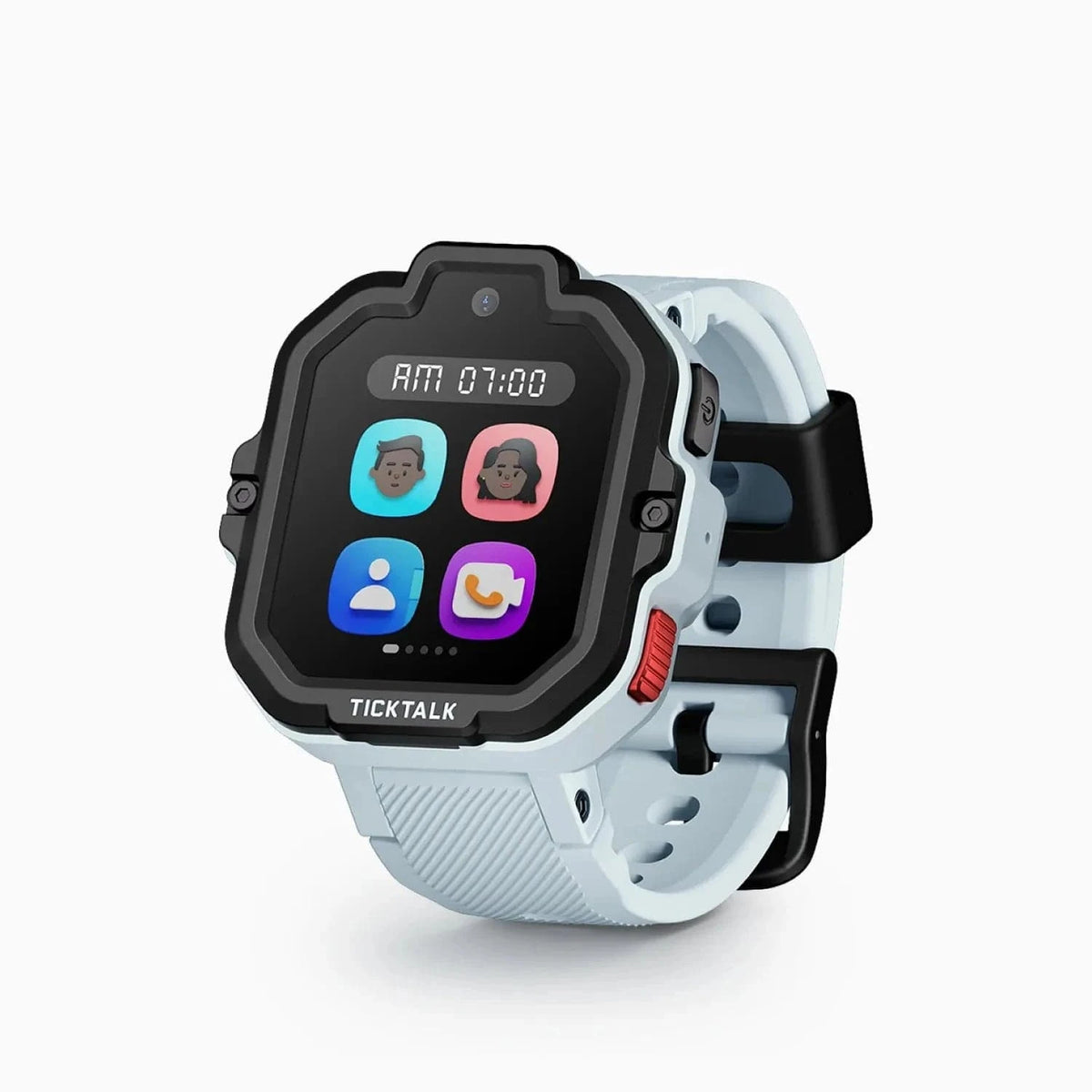
| TickTalk 5 | $159.99 | ★★★★☆ 4.3 | 3-12 | Officially rated for ages 3+, one of the few watches designed this young | |
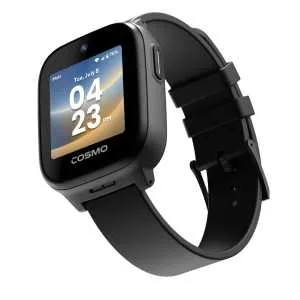
| COSMO JrTrack 5 | $99.99 | ★★★½☆ 3.5 | 4-12 | Budget GPS Pick | |
| VTech KidiZoom DX3 | $69.99 | ★★★½☆ 3.7 | 4-9 | Best for Most 4-Year-Olds |
Prices may vary. As an Amazon Associate we earn from qualifying purchases.
Affiliate Disclosure: This article contains affiliate links. If you purchase through our links, we may earn a small commission at no extra cost to you. We only recommend products we have personally tested and believe in. Our opinions are our own and are not influenced by any affiliate partnerships.
Top pick: For most 4-year-olds, the VTech KidiZoom DX3 ($69.99) is the best choice -- it is durable, educational, and has no monthly fee, since preschoolers are almost always supervised and rarely need GPS. If you do want GPS and calling, the TickTalk 5 ($159.99) was our cellular pick because it is one of the few watches officially rated for ages 3 and up -- TickTalk has replaced it with the TickTalk 6, but it is back in stock on Amazon -- with the COSMO JrTrack 5 ($99.99, list $129.99) as a budget GPS alternative.
Let me start with the question I know you are already asking, because every parent who lands on this page is asking it: is four years old too young for a smartwatch? If your child is even younger -- say, three -- we have a separate guide on the best smartwatches for 3-year-olds that covers what works at that age.
The honest answer is: it depends on what you mean by "smartwatch" and why you want one.
If you are picturing your preschooler tapping through menus, sending messages, and navigating a GPS-enabled cellular device independently, then yes, four is probably too young for that. Most four-year-olds are still figuring out zippers. The idea that they are going to troubleshoot a dropped Bluetooth connection is optimistic, to put it gently.
But if you are picturing a simple, colorful device on their wrist that helps them learn to tell time, takes goofy photos, and maybe gives you some peace of mind at preschool dropoff, then no, four is not too young at all. You just need the right device.
I tested three watches with a four-year-old over the past several weeks, and what I learned is that the "best" smartwatch for a four-year-old is almost certainly not the one with the most features. It is the one your kid can actually use without your help, will not destroy in the first week, and does not cost you a monthly subscription fee unless you specifically need GPS tracking.
Let me walk you through what I found.
I want to spend a minute on this because I think it is the most important section of this entire article.
Four-year-olds are in a fascinating developmental stage. They are curious, enthusiastic, and increasingly independent. They want to do everything their older siblings do. They can follow multi-step instructions. They are learning letters and numbers. Some of them can even write their own name. These are all encouraging signs for watch readiness.
But four-year-olds also have genuinely tiny wrists, typically around 4 to 5 inches in circumference. Their fine motor skills are still developing, which means precise swiping and tapping on a small screen is hit-or-miss. They have limited reading ability, so text-based menus are essentially useless. And their understanding of "take care of this expensive thing" is, let us say, still emerging.
Here is the framework I use when parents ask me if their four-year-old is ready:
Your 4-year-old is probably ready for a smartwatch if:
You might want to wait if:
Neither answer is wrong. You know your kid. I just want to make sure you are making the decision with realistic expectations.
The criteria for a four-year-old are different from what I would look for at five, six, or seven. Here is what matters most at this age.
This is non-negotiable. If the watch is heavy or bulky, your four-year-old will rip it off within an hour. I have seen it happen in real time. The watch needs to feel like almost nothing on their wrist, or it is coming off and going into a pocket, a backpack, a sandbox, or the abyss.
A four-year-old is not going to learn a multi-layered menu system. The best interfaces for this age use big, colorful icons, minimal text, and require no more than one or two taps to do anything. If your child needs to swipe through three screens and tap a tiny icon to call you, that is not going to work in an actual emergency.
Four-year-olds are remarkably hard on things. They are not malicious about it, they are just enthusiastic in a way that is structurally challenging for consumer electronics. The watch needs to survive drops onto concrete, collisions with playground equipment, exposure to sand, and contact with every fluid a preschooler encounters throughout the day. You know the fluids I mean.
This is where I might differ from some other reviewers. I believe most four-year-olds do not need GPS tracking on their wrist. At four, your child is almost always with a trusted adult: you, a daycare provider, a grandparent, a preschool teacher. They are not walking to school alone or playing unsupervised at the park.
There are exceptions. If your child splits time between two households and you want location awareness during transitions, GPS makes sense. If you are in a situation where your preschooler is at a large facility and you want the extra layer of tracking, that is valid. But for the average four-year-old in a typical preschool or daycare situation, a watch without cellular connectivity is perfectly fine and saves you $10 to $15 per month. For a thorough comparison of what those plans cost, see our kids smartwatch monthly plans compared guide.
Here is a genuine benefit of a smartwatch at age four that does not get enough attention: it can help your child learn to tell time. A watch with both analog and digital display options, or one that includes time-teaching games, is actually serving an educational purpose. Our four-year-old tester went from not understanding clock hands at all to identifying the hour hand within two weeks. That alone justified the purchase for his parents.
| Feature | TickTalk 5 | COSMO JrTrack 5 | VTech KidiZoom DX3 |
|---|---|---|---|
| Price | $159.99 | $99.99 | $69.99 |
| Best For | Parents who need GPS + calling | Budget GPS option | Most 4-year-olds |
| Age Range | 3-12 | 4-12 | 4-9 |
| GPS Tracking | Yes | Yes | No |
| Calling | Yes (video + voice) | Yes (voice) | No |
| SOS Button | Yes | Yes | No |
| Camera | Yes | Yes | Yes (dual cameras) |
| Monthly Fee | ~$10-15/month | ~$10/month | None |
| Battery Life | 1-2 days | ~24 hours | 2-3 days |
| Games | Minimal (can disable) | Minimal (can disable) | Yes (educational) |
| Durability | Good | Good | Excellent |
| Rating | 4.3/5 | 3.5/5 | 3.7/5 |
| Our Pick | Former top pick (GPS) | Budget GPS alternative | Best for most 4-year-olds |
I am putting this one first even though it is the least expensive option because, frankly, it is the right watch for most four-year-olds. I know that might sound strange coming from a site that mostly reviews GPS-enabled cellular watches, but I am going to be honest with you: most preschoolers do not need a $150 cellular watch with a monthly plan. They need something fun, durable, and educational that they can actually operate on their own. The KidiZoom DX3 is exactly that.
VTech has been making kids electronics for decades, and it shows. This watch was clearly designed by people who have spent time around actual small children. The buttons are chunky and satisfying to press. The interface uses big, bright icons that a pre-reader can navigate by picture alone. The screen is protected by a raised bezel that absorbs impacts when your child inevitably smacks it into a doorframe. You can read our full VTech KidiZoom DX3 review for the deep dive, but here are the highlights for four-year-olds specifically.
The dual cameras are the standout feature for this age group. There is a front-facing camera for selfies and a side-mounted camera for regular photos. Our four-year-old tester was absolutely delighted by this. He took roughly 300 photos in the first three days, most of which were extreme close-ups of his own eyeball or blurry shots of the dog's tail. He did not care about quality. He cared about the fact that he had a camera on his wrist like a spy, and that alone made the watch the coolest thing he owned.
The time-teaching features are genuinely useful. The watch includes games and activities specifically designed to help young kids learn to read both analog and digital clocks. For a four-year-old who is just starting to grasp the concept of time, this is real educational value. It turns "what time is it?" from an abstract concept into something interactive and fun.
There are also games on this watch, and I want to be transparent about that. Some parents will love them (built-in entertainment for waiting rooms). Some parents will hate them (distraction during preschool). Unlike the cellular watches on this list, you cannot remotely disable the games. You will need to set ground rules with your child about when game time is and is not allowed. At four, those rules actually work reasonably well because preschoolers are still in the "I want to please adults" phase. Mostly.
The battery lasts two to three days, which is significantly better than any cellular watch. And there is no monthly fee. You buy the watch, and that is it. No SIM card, no cellular plan, no subscription. For a device that might end up abandoned in a toy bin after three months, that zero-ongoing-cost aspect is genuinely important. For more options like this, see our best kids smartwatches with no monthly fee roundup.
What it does not do: The KidiZoom DX3 has no GPS, no cellular connectivity, no calling, and no SOS button. It is not a safety device. You cannot track your child's location or have them call you in an emergency. If those features are your primary reason for buying a watch, skip to the TickTalk 5 or COSMO JrTrack 5 below.
Pros:
Cons:
Can a 4-year-old operate it independently? Yes, absolutely. This is the watch our tester figured out fastest. Within the first hour he was taking photos, switching watch faces, and playing the time-teaching game without any help. The interface was clearly designed for exactly this age group, and it shows.
Update (October 2026): back in stock on Amazon. TickTalk has replaced the TickTalk 5 with the TickTalk 6 and its own store is sold out, but Amazon has the TickTalk 5 in stock again at $159.99, sold by TickTalk's Amazon storefront. It is no longer our GPS pick: stock is finite and its successor is on pre-order. The write-up below still stands.
If you have decided that you do need GPS tracking and calling capability for your four-year-old, the TickTalk 5 was our pick. It is one of the very few cellular smartwatches that is officially rated for ages three and up, and that age rating is not just marketing. The interface was genuinely designed with very young children in mind. We go into much more detail in our TickTalk 5 review, but here is what matters for four-year-olds.
The contact list uses large photos instead of text, which is essential for pre-readers. Our tester could find and call "Mommy" and "Daddy" by tapping their pictures within the first day. The SOS button is a dedicated physical button that is easy to find by feel, not buried in a menu. We practiced the SOS sequence several times, and by the third try our tester could activate it without hesitation.
The video calling feature is particularly useful at this age. When a four-year-old calls you and you can see their face, you get a lot more information than from a voice call alone. Are they actually scared, or did they just want to show you a bug they found? You can tell immediately. Our tester loved video calls because, in his words, "I can see you on my watch." The novelty of that did not wear off during the entire testing period.
GPS tracking was accurate and reliable in our testing. The TickTalk 5 uses a combination of GPS, Wi-Fi, and cellular positioning to report location, and I consistently got results within about 20 to 40 feet of the actual position. The companion app lets you set geofences and get alerts when your child arrives at or leaves a designated area. For parents who want to confirm their preschooler arrived at daycare or that the other parent picked them up on time, this is genuinely reassuring.
The watch does have a few games and features that you will want to disable for a four-year-old. The parent app gives you full control over which features are active, and I recommend starting with just time display, contacts, calling, and SOS. You can always enable more features later as your child gets older and more capable.
The main drawback is cost. At $159.99 for the watch plus a monthly cellular plan of roughly $10 to $15, this is a significant investment for a device strapped to a preschooler's wrist. If your child loses it, breaks it, or decides they do not want to wear it anymore, that stings. The battery life of one to two days also means you need to charge it nightly, which adds another item to the bedtime routine.
The watch face is slightly large for the smallest four-year-olds. Our tester has average-sized wrists for his age, and the watch fit on the smaller band holes but looked proportionally big. It stayed on securely and he did not complain about weight, but if your child is on the petite side, try it on before committing.
Pros:
Cons:
Can a 4-year-old operate it independently? For the basics, yes. Our tester could make and receive calls and activate SOS within the first two days. Navigating beyond the home screen and contacts took about a week of practice. I would not expect a four-year-old to use every feature independently, but the core safety functions are very accessible.
The COSMO JrTrack 5 offers a similar feature set to the TickTalk 5 at a lower price point, which makes it worth considering if you want GPS and calling but the TickTalk's price tag gives you pause. You can find our comprehensive COSMO JrTrack 5 review for the full breakdown.
The JrTrack 5 includes GPS tracking, two-way calling, SOS, messaging, and a camera. The interface uses colorful icons that are reasonably large, and our four-year-old tester was able to learn the basics within a few days. It is not quite as intuitive as the TickTalk 5 for the youngest users, but it is close enough that the $60 savings might tip the scales for some families.
The SOS function works reliably. Hold the dedicated button and it calls your preset emergency contact while sending a location ping. Our tester understood the concept after a few practice sessions, though he needed slightly more guidance than with the TickTalk's more prominent button.
GPS accuracy was comparable to the TickTalk 5, generally within 30 to 50 feet in our outdoor testing. The parent app provides location tracking, geofencing, and remote feature management. You can disable games and non-essential features, which I recommend doing for a four-year-old.
Where the JrTrack 5 falls a bit short for this age group is build quality and interface polish. The watch feels slightly less premium than the TickTalk 5, and the navigation requires a touch more dexterity. For a six-year-old, this would not matter at all. For a four-year-old whose fine motor skills are still developing, the difference is noticeable. A few of the menu icons are small enough that our tester sometimes tapped the wrong one, which led to frustration.
The 3.5-star average rating reflects some of these rough edges. It is not a bad watch by any means, but it lacks the polish of the TickTalk 5. If budget is a primary concern and you need cellular capability, the JrTrack 5 gets the job done. If you can stretch to the TickTalk 5, the extra $60 buys you a noticeably better experience for a four-year-old.
Pros:
Cons:
Can a 4-year-old operate it independently? For basic calling and SOS, yes, after about three to four days of practice. Full menu navigation is challenging for most four-year-olds due to some smaller interface elements. If your child is on the more coordinated side for their age, they will manage. If they are still developing those fine motor skills, expect to help them more often.
I get asked about both of these regularly, so let me address them briefly.
Apple Watch: No. Not at four. The smallest Apple Watch (SE, 40mm) is far too large for a four-year-old's wrist. The interface is designed for adults. The price is prohibitive for a device a preschooler will abuse. And Family Setup, while clever, assumes a level of reading and dexterity that no four-year-old possesses. Save the Apple Watch for age eight or nine at the earliest.
Garmin Vivofit Jr. 3: This is actually a solid option for four-year-olds, and we recommend it heavily in our best smartwatches for 5-year-olds guide. It has a year-long battery, Disney/Marvel themes, and a chore reward system that preschoolers respond to well. However, it is a fitness tracker, not a smartwatch. No GPS, no calling, no camera. If you want those specific features, the Vivofit Jr. 3 is excellent. But since this article focuses on smartwatches specifically, I have focused on watches that offer more functionality. If you are open to a fitness tracker, seriously consider the Vivofit Jr. 3 alongside the VTech KidiZoom DX3.
These tips come from hands-on experience with our preschool-age tester. Four-year-olds are a different animal from five-year-olds, and the setup process matters more than you think.
Whatever watch you choose, start with the fewest possible features enabled. For a cellular watch, that means time display, calling (with photos for contacts), and SOS. That is it. Do not enable messaging, camera, games, or any other feature on day one. Let your child master the basics first. After a week or two, add one feature at a time.
Four-year-olds cannot read. Every contact should have a clear, recognizable photo. If the watch supports custom wallpapers or watch faces, use a photo your child associates with home or family. Visual recognition is your child's primary way of navigating the world right now, and the watch should work the same way.
Do not frame the SOS button as something scary. We told our tester it was his "call Mom and Dad button" and made practicing it a fun game. "Okay, show me how you call Daddy on your super watch." Lots of high-fives when he got it right. After a dozen practice rounds over the first week, it was second nature.
Four-year-olds take things off. Shoes, shirts, hats, and yes, watches. Do not panic the first time the GPS shows the watch sitting at preschool while your child has apparently vanished. They probably just took it off during art time and left it on the table. Have a conversation about keeping the watch on, but set realistic expectations. It will come off sometimes.
Unlike with a five or six-year-old, I do not recommend asking a four-year-old to manage their own charging routine. Just take the watch at bedtime and put it on the charger yourself. One less thing to fight about.
Before the watch shows up on your child's wrist at school, have a conversation with their teacher. Explain what the watch does, show them school mode if the watch has it, and ask about the school's policy on wearable devices. A proactive conversation prevents a confusing or embarrassing situation on day one. The VTech KidiZoom DX3 is generally the easiest sell to teachers since it has no cellular connectivity, but even then, a heads-up is courteous.
This is really the core decision, and I want to make it as clear as possible.
Choose the VTech KidiZoom DX3 (no GPS, no monthly fee) if:
Choose the TickTalk 5 or COSMO JrTrack 5 (GPS + calling) if:
There is no wrong answer here. The VTech is the right choice for the majority of four-year-olds in typical situations. The TickTalk 5 was our pick for specific circumstances where GPS and calling provide real value; TickTalk has replaced it with the TickTalk 6, but it is back in stock on Amazon. The COSMO JrTrack 5 is the right choice if you need GPS features on a tighter budget.
For a broader look at what is available across all ages, our best kids smartwatches 2026 guide covers everything, and our kids smartwatch buying guide walks through the decision-making process in detail.
Not necessarily, but it depends on the type of smartwatch and your child's development. A four-year-old is too young for a complex device with internet access, apps, or text-based navigation. However, a simple watch like the VTech KidiZoom DX3, which uses picture-based menus and requires no reading, works very well for most four-year-olds. If you want GPS and calling, the TickTalk 5 is one of the few watches officially rated for ages three and up, and our four-year-old tester was able to make calls and activate SOS within a couple of days. The key is matching the device to your child's actual abilities, not the abilities listed on the box.
It depends on the watch. Our four-year-old tester operated the VTech KidiZoom DX3 independently within the first hour. The large buttons, picture-based menus, and simple interface were a natural fit. For the cellular watches (TickTalk 5 and COSMO JrTrack 5), he could make calls and activate SOS within two to four days of practice. Full navigation of all features took longer and sometimes required help. At four, you should expect to assist with setup and occasionally with operation, especially for GPS-enabled watches.
Most four-year-olds do not need GPS tracking because they are rarely unsupervised. They are at home with you, at preschool or daycare with trusted adults, or at a relative's house. GPS tracking becomes more valuable as children gain independence, typically around age six or seven. That said, GPS can provide peace of mind in specific situations: shared custody arrangements, large daycare facilities, crowded public outings, or if your family situation involves any custody concerns. If none of these apply, a non-GPS watch like the VTech KidiZoom DX3 is likely the better and more affordable choice.
Most kids smartwatches will fit, but many run proportionally large on a 4-year-old's 4-to-5-inch wrist, so fit varies by model. Four-year-olds typically have wrist circumferences of 4 to 5 inches, which is smaller than what many kids smartwatches are designed for. The VTech KidiZoom DX3 fits this age group well because it was specifically designed for children as young as four. The TickTalk 5, rated for ages three and up, also fits on the smaller band holes, though the watch face looks proportionally large. The COSMO JrTrack 5 fits but can feel slightly bulky on the smallest wrists. Before buying, measure your child's wrist with a flexible tape measure and compare it to the watch's minimum band circumference. You can always punch an extra hole in a silicone band if needed.
The VTech KidiZoom DX3 is the best no-monthly-fee smartwatch for four-year-olds. At $69.99 with zero ongoing costs, it offers dual cameras, time-teaching games, a step counter, and a durable build that is designed specifically for young children. The trade-off is that it has no GPS tracking, no calling, and no SOS button. If you want a no-fee option with fitness tracking instead, the Garmin Vivofit Jr. 3 is another excellent choice, though it lacks the cameras and games that preschoolers tend to love. For a comprehensive list, check our best kids smartwatches with no monthly fee guide.
The most effective strategy is to choose a watch your child actually wants to wear and make putting it on part of the morning routine. This is a real concern at four. Our best advice: make wearing the watch part of the morning routine, just like putting on shoes. "Shoes, watch, backpack, let's go." Consistency builds habit. Some parents attach a breakaway lanyard to the watch band as a backup, though I would not recommend this for safety reasons during active play. The most effective strategy is choosing a watch your child actually wants to wear. If they love it, they are far less likely to take it off. Our tester rarely removed the VTech KidiZoom DX3 because he was constantly using the camera, which meant it stayed on his wrist.
Get a dedicated GPS tracker like the Jiobit if location is your main concern, or a smartwatch if you want a fun, interactive wrist device. If your primary concern is knowing your child's location, a dedicated GPS tracker like the Jiobit, which clips to clothing or a backpack, might be a better choice than a wrist-worn watch. Trackers are impossible for a four-year-old to accidentally remove, have longer battery life, and have no screen to break or distract. If you want your child to have a fun, interactive wrist device and GPS tracking is secondary or unnecessary, a smartwatch is the way to go. Some parents use both: a no-fee watch like the VTech KidiZoom DX3 for fun and learning, plus a clip-on GPS tracker for location peace of mind.
All three watches in this article work great for five-year-olds too, so you would not be buying something your child will outgrow. If your child is about to turn five, you might want to look at our best smartwatches for 5-year-olds guide, which includes a wider range of options. The watches recommended in this article all work great for five-year-olds too, so you would not be buying something they will outgrow. The VTech KidiZoom DX3 is rated for ages four to nine, and the TickTalk 5 goes up to age twelve. If you are on the fence, buy now and know that the watch will grow with your child for years. And once they hit six, our best smartwatches for 6-year-olds guide covers the next stage.
Shopping for a smartwatch for a four-year-old is tricky because the honest truth is that most smartwatches are not designed for this age group. They are designed for seven-to-twelve-year-olds and then hopefully work for younger kids too. The three watches on this list are the exceptions, watches that genuinely work at age four because they were designed with very young children in mind.
For most four-year-olds, the VTech KidiZoom DX3 is the right choice. It is affordable, fun, educational, durable, and has no monthly fee. It will not track your child's location or let them call you, but for a preschooler who is always supervised, those features are not necessary. What it will do is delight your child, teach them to tell time, and give them a sense of having their own "big kid" device without the complexity or cost of a cellular watch.
If you need GPS and calling, the TickTalk 5 was our pick for four-year-olds; TickTalk has replaced it with the TickTalk 6, but it is back in stock on Amazon while stock lasts. Its age 3+ rating is not just marketing, the interface and physical design genuinely accommodate very young kids. It costs more and requires a monthly plan, but if you need those features, it delivers them in a genuinely preschooler-friendly package.
The COSMO JrTrack 5 is a solid budget alternative if you want GPS capability without the TickTalk's price tag. It is not quite as polished for the youngest users, but it covers the essentials at a lower cost.
Whatever you choose, set realistic expectations. Your four-year-old is going to accidentally call you during nap time. They are going to take 500 blurry photos of nothing. They might take the watch off at the worst possible moment. That is all normal. Give it two or three weeks before you decide whether the watch is working for your family.
For the latest pricing on all three watches, check our deals page. And if you want to see how these options compare to the full landscape of kids watches, our best kids smartwatches 2026 guide has everything ranked and reviewed.
Start simple. Your preschooler will thank you, probably by showing you 47 photos of their own nostril.
Finding a smartwatch a 5-year-old can actually use isn't easy. We tested 8 watches with a kindergartner to find the ones that are truly young-kid friendly.

Most kids smartwatches aren't designed for 3-year-olds. We tested which ones work at this age, which ones don't, and whether your toddler actually needs a smartwatch yet.
Six is when kids start exploring on their own. We tested the top GPS smartwatches with a 6-year-old to find the ones that are simple, durable, and parent-approved.
Find the best smartwatches for 10-year-old girls with GPS, calling, cameras, fitness tracking, and stylish designs. Expert picks she'll actually want to wear.
Age 7 is the sweet spot for a first kids smartwatch. We tested the top GPS watches with a 7-year-old to find the best fit for first graders and second graders gaining independence.
New review alerts, deal drops, and seasonal buying guides — delivered weekly. No spam, unsubscribe anytime.
No spam. Unsubscribe anytime.